
298002 - TLS/SSL Certificate Error
Agent error code #298002 indicates that the agent encountered a TLS/SSL certificate error when attempting to connect to a firewall. The secure connection could not be established because the certificate presented by the firewall failed validation.
This error occurs when:
- The firewall is using a self-signed certificate that is not trusted by the agent
- The certificate was issued by a Certificate Authority (CA) that is not in the agent's trust store
- The certificate has expired or is not yet valid
- The certificate's hostname does not match the hostname configured in Knocknoc (e.g., connecting to
192.168.1.1but the certificate was issued forfirewall.example.com) - The certificate is otherwise invalid or malformed
Steps to Resolve
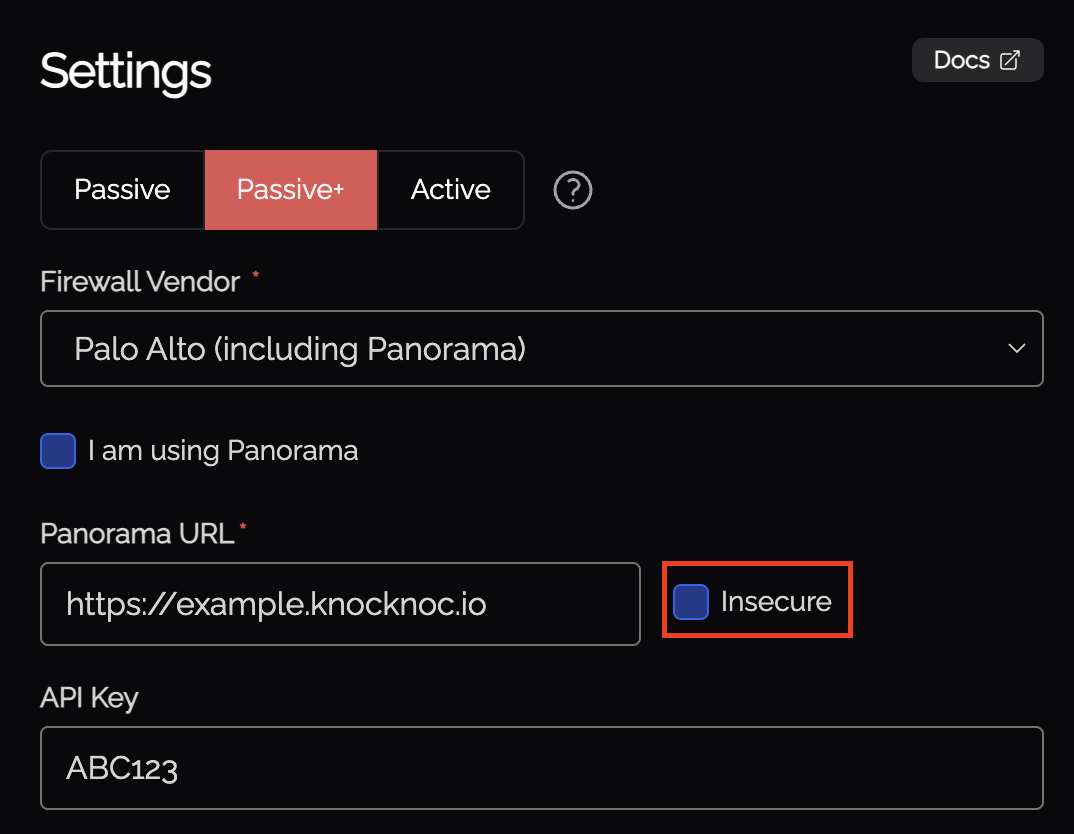
Option 1: Enable Insecure Mode (Self-Signed Certificates)
If your firewall uses a self-signed certificate or a certificate from an internal CA, you can configure the agent to skip certificate verification:
- In the Knocknoc admin interface, navigate to the Knoc configuration for the affected firewall
- Enable the Insecure option (sometimes labeled "Skip TLS Verification" or similar)
- Save the configuration
This option tells the agent to accept the certificate without validating it against a trusted CA. This is common when the firewall is running locally or within an isolated network - the connection is still encrypted, just not externally verified.
Option 2: Use a Valid Certificate on the Firewall
For production environments, consider configuring your firewall with a certificate that the agent can validate:
- Obtain a certificate from a trusted Certificate Authority, or use an internal CA that is trusted by the system running the agent
- Install the certificate on your firewall's management interface
- Ensure the certificate's Common Name (CN) or Subject Alternative Name (SAN) matches the hostname configured in Knocknoc
Option 3: Verify Hostname Configuration
If the certificate is valid but the hostname doesn't match:
- Check the hostname configured for this backend in Knocknoc
- Ensure it matches exactly what appears in the certificate (check both the Common Name and Subject Alternative Names)
- If using an IP address, consider switching to the hostname that appears in the certificate, or vice versa
Option 4: Check Certificate Expiry
If the certificate has expired:
- Log into your firewall's management interface
- Check the certificate expiration date
- Renew or replace the certificate if it has expired