Windows Servers
Windows Servers and RDP/WinRM - removing pre-auth attack surface
A mid-sized business uses RDP and WinRM to manage a Windows fleet of servers, however wasn't comfortable with always-on network exposure of these ports/protocols - even to internal management networks. They wanted to tie RDP/WinRM access to their IDP with MFA applied at the network layer, and discovered Knocknoc's on-host Windows firewall mode.
The goal: tie network-level RDP/WinRM port-level exposure and access to their identity provider, while keeping the experience seamless without a change of desktop-client nor undertaking a big micro-segmentation project.
Knocknoc was deployed using its on-host Windows firewall orchestration mode. Within days, all RDP/WinRM services were rendered invisible until users centrally authenticated, effectively removing the pre-auth attack surface even for internal operators.
The result: invisible management ports/services before authentication, time-bound network access restrictions with user level attribution, no change to users' client/desktop machines, a drastically reduced risk profile, and live in a matter of days.
Technical how:
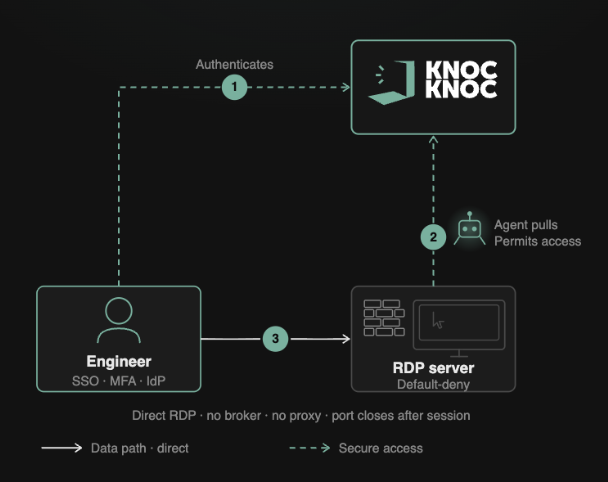
The receiving Windows Firewall is managed by an on-host Knocknoc Agent, dynamically opening access to the ports/services only after a user logs in. These users must be authorized and in the permitted groups to allow their source IP address to be permitted, with the firewall automatically blocking access on logout or on timer expiry.
This fast and efficient on-host firewall orchestration approach is great for RDP or ports/services you want invisible on the network prior to users logging in.
This prevents attackers on the LAN discovering hosts, ports/services or fingerprinting applications like backup software/servers for onward exploitation, lateral movement or exploitation of Windows based vulnerabilities.
Shown below, the user first logs in to Knocknoc (auth tied to their IdP), the Knocknoc orchestration-agent then receives instruction to open the firewall to port 3389/tcp from the user's IP address and the user then connects. No proxy/broker, no additional routing nor client installation is required, simple but very effective firewall orchestration.
This essentially removes attack surface of your RDP hosts until users centrally log in.