
Grant and revoke process
What triggers a grant or revoke
The granting and revoking of access by Knocknoc occurs on a number of events, including:
- User login
- Interactive 'click to grant' activity
- Interactive 'click to revoke' activity
- User login/session timeout
- Grant timeout (device/back-end specific)
- User logout
External factors such as the flushing of lists/policies on the orchestrated system (e.g., an unrelated firewall reboot) may also cause the granted access to be revoked, however this depends on the orchestrated system or device persistence settings.
What gets granted
A Knoc normally grants the IP address the user logged in from. A Knoc set to use predefined sources grants a fixed list instead, and each entry in that list can be a single address or a whole network in CIDR form, so one login can open access for an entire subnet.
When grants persist unexpectedly
Grants may unintentionally persist if:
- The Agent loses the ability to contact the orchestrated device (e.g., active API integration to a commercial firewall / a network level outage/connectivity fault) to remove access as part of a logout/revocation.
- The Agent is taken offline/the host machine loses power or network connectivity to the Knocknoc server is severed.
In these cases, when the Agent is brought back online or otherwise re-establishes connectivity, it will reconcile the granted trust and revoke/establish any missing entries on the underlying orchestrated device(s).
Where an orchestrated back-end supports an expiry time, these will be automatically dissolved/revoked by the device even if Agent<->Device/network access is severed.
Viewing grant history on a Knoc
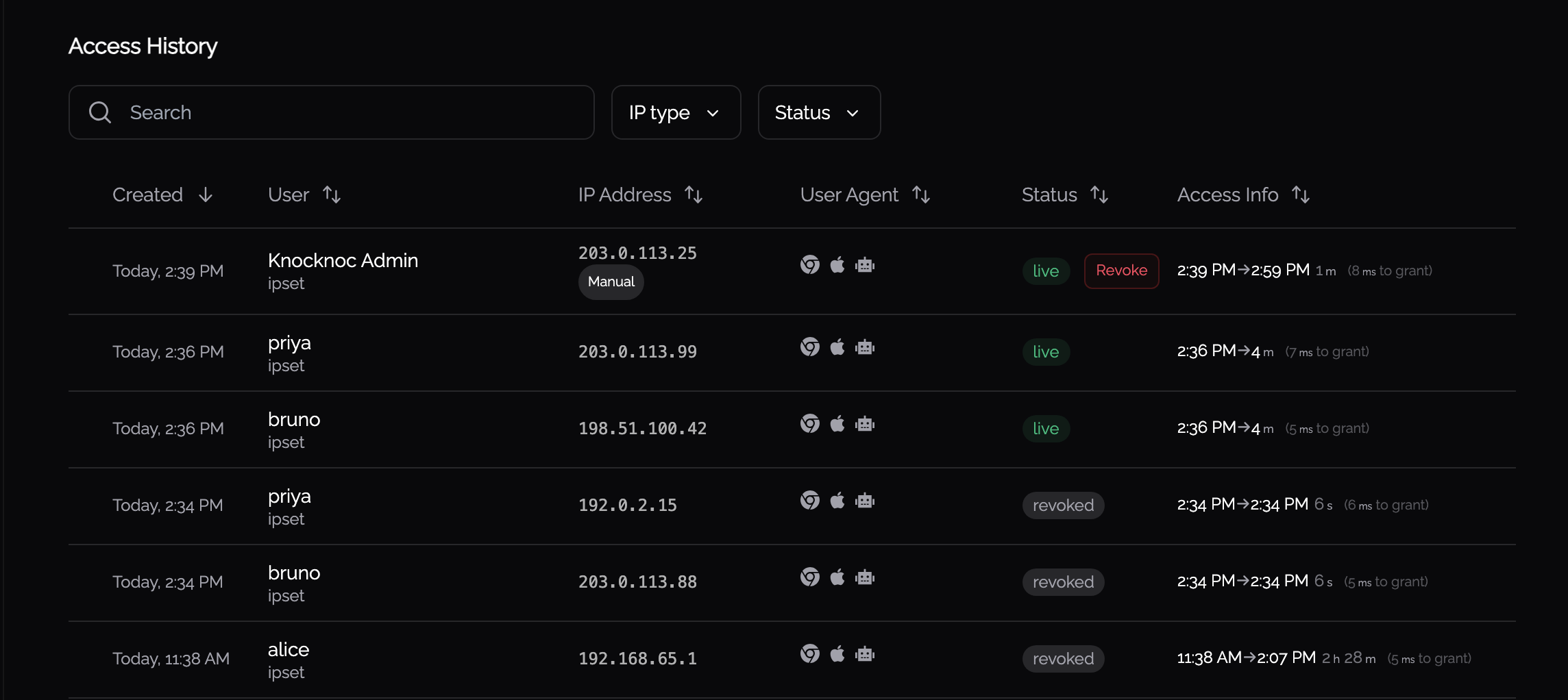
Each Knoc's admin page lists its recent grants and revocations. You can filter the list by Status (such as Live, Revoked, or Blocked) and by IP type, and sort the columns to find a particular entry. Each row shows who or what the grant belongs to, the IP address, its current status, and when it was granted and revoked.
When a device is unreachable
If the Agent can't connect to the device behind a Knoc, it pauses changes to that Knoc for a short time. This stops one unreachable device from slowing down every other Knoc that uses the same kind of integration, because the Agent works through each integration type one change at a time, and every change for a missing device would otherwise wait out a connection timeout.
When a Knoc is paused
The Agent pauses a Knoc after two changes in a row fail to connect to its device. A failure to connect means the connection timed out, was refused or found no route, or the device's name did not resolve.
A device that accepts the connection and then answers slowly is not paused. This is usually a firewall busy with a commit, and the Agent gives it the normal timeout and retry.
Each Knoc is paused on its own. If two Knocs use the same device, each one is paused after its own two failures.
While a Knoc is paused
- Grants are still sent to the device. A user gets access as soon as the device can accept it, and a grant that goes through ends the pause.
- Revokes are held back. They fail with agent error #299003 (Device is unreachable) and the Agent doesn't contact the device. Until the revoke is re-sent, the address may still have access on the device.
- A full resync of the Knoc, for example after the Agent reconnects, sends one grant to the device as a check. If that check can't connect, the rest of the resync fails with #299003 straight away instead of each change waiting to time out. The next grant for each address applies it again.
How a Knoc is unpaused
The first pause lasts two minutes. When it ends, the next change for the Knoc is sent to the device as a check:
- If the device answers, the pause ends. Any answer counts, including an error from the device.
- If the check can't connect, the pause starts again at double the length, up to a limit of fifteen minutes.
A grant that goes through during the pause also ends it.
When the pause ends, the Agent asks the Knocknoc server to send the held-back revokes again and removes those addresses from the device within a minute or so. If nothing else arrives for the Knoc, the Agent does this when the pause runs out, and the re-sent revokes act as the check. You don't need to restart the Agent or re-send anything yourself.
What the administrator sees
In the Knoc's grant history, a grant whose revoke could not be applied shows the status revoke failed, with the Agent's error beside it. It is listed first, because the address may still have access on the device. The Errors status filter includes these rows. Once a later revoke succeeds, the row goes back to reading as a normal revoke.
The Agent's log records each pause with the connection error that caused it. Look for "could not connect to device on consecutive operations". That error's code links to the steps for your device.
Resolving an unreachable device
- On the Agent's host, check that the device's management address answers, for example by opening its API URL with
curl. - Check the address and port set on the integration.
- Check for a firewall rule, route or VPN change between the Agent and the device.
- Check that the device itself is up.
When the device answers again, the pause ends on the next change and the held-back revokes are applied. See 299003 - Device Is Unreachable for more detail.