
SAML
Knocknoc supports up to six identity providers for user logins, and one provider of its own for the admin portal. Separating the admin provider lets MSPs and security teams manage users and Knocs without being granted access to the services being protected.
Several user providers is what a deployment needs when the people signing in do not all come from one directory: a school with one provider for parents and another for students, or a business with employees in one and contractors in another. Each provider gets its own button on the login page, and each is a separate namespace, so the same username in two directories is two accounts with their own groups and access. Configuring more than one user provider requires an Enterprise license.
In single IdP environments Knocknoc supports users and admins from a single authentication source. Admin access can be authorized using groups or other keys within the IdP response.
SAML in Knocknoc
When configuring SAML in Knocknoc:
- Identify the IdP and SP: Knocknoc is the SP, and your provider is the IdP (e.g. OKTA, EntraID, Jumpcloud).
- Configure Assertions: Customize the assertions to include the necessary user information, this can include sending group information and/or static assertions.
- Test the SAML Flow: Ensure that the authentication flow works as expected and is secure, SAML responses can be tested using tools like SAML trace.
- Monitor and Update: Regularly monitor the SAML setup and update as necessary, considering any new security patches or compliance requirements.
Available assertion configuration
A user identifier and any groups are the minimum required. The user identifier can be anything, an email address, UUID or other. Group membership must be passed in the "groups" attribute. Below are the minimum and optional assertions:
Minimum assertions
|
Assertion |
For |
Used For |
| NameID | Users & Admins | The username. Any stable, unique value works, such as an email or an object ID. Keep it the same over time, because a changed NameID signs the person in as a new accout. |
| groups | Users | Gives the user their Knocknoc SAML groups, which decide what they can access. Sent on every login. A login with an empty groups array removes the user from all groups. |
Note: Attribute names are not case-sensitive, so realName, RealName and realname are all treated the same.
Optional assertions
|
Assertion |
For |
Used For |
| realName | Users & Admins | The display name shown in Knocknoc. Recommended when the NameID is an ID instead of an email. |
| groups | Admin | Signs in, and creates if needed, any admin who is a member of the configured admin group. |
| company | Users | The company shown on the user's profile. |
| sessionDuration | Users | How long a session lasts, in minutes. The default is 420 (7 hours). |
| sessionLimit | Users | The most sessions the user can have open at once. It can't go above your licence's limit. |
| allowPersistentIPs | Users | true lets the user register persistent IP devices. |
| allowAgenticAccess | Users | true lets the user use agentic access. |
User SAML versus Admin SAML
Knocknoc keeps user and admin identities separate. The admin portal has one identity provider of its own, and user logins can have up to six. The two sign-in flows provision accounts differently:
- Users are provisioned automatically on first sign-in. A user's Knocknoc group membership, and therefore the Knocs they can reach, is derived from the group values their assertion carries.
- Admins can be provisioned in either of two ways, configured under Settings -> Authentication -> Admin provisioning: by being pre-created in the admin portal, or by membership of a nominated SAML group. At least one of these must be enabled. See Admin provisioning below.
Several user identity providers
Providers are added under Settings -> Authentication, up to six. Configuring more than one requires an Enterprise license, and a license that lapses stops the extra login buttons appearing. Each provider is named, and that name is the label on its button on the login page.
A username belongs to the provider that asserted it, so "alice" from one directory and "alice" from another are two accounts with their own groups and access. A provider asserting a name it has not seen before creates an account rather than signing in to somebody else's.
Groups are scoped the same way. A SAML or dynamic group names the providers whose assertions it matches, so one directory's "CanSSH" is not the other's, and a group can instead be set to match any provider including ones added later. See Create groups.
Deleting a provider leaves the accounts it owned in place rather than handing their names to the next provider that asserts them, which is the takeover this separation exists to prevent. Delete those accounts yourself if you want the names released.
Portal URLs and SAML
The Public URL under Settings > Authentication is the address Knocknoc gives your identity provider to send people back to. Both the user and admin sides use it.
To put the admin portal on its own hostname, set an Admin portal URL under Advanced SAML configuration in the Admin SAML settings. It appears once admin SAML is configured. Leave it empty and both sides keep sharing the Public URL.
Setting it changes the admin entity ID and Assertion Consumer Service URL, so download the service provider metadata again and re-register the admin application with your identity provider. User SAML is unaffected.
Reviewing your SAML setup
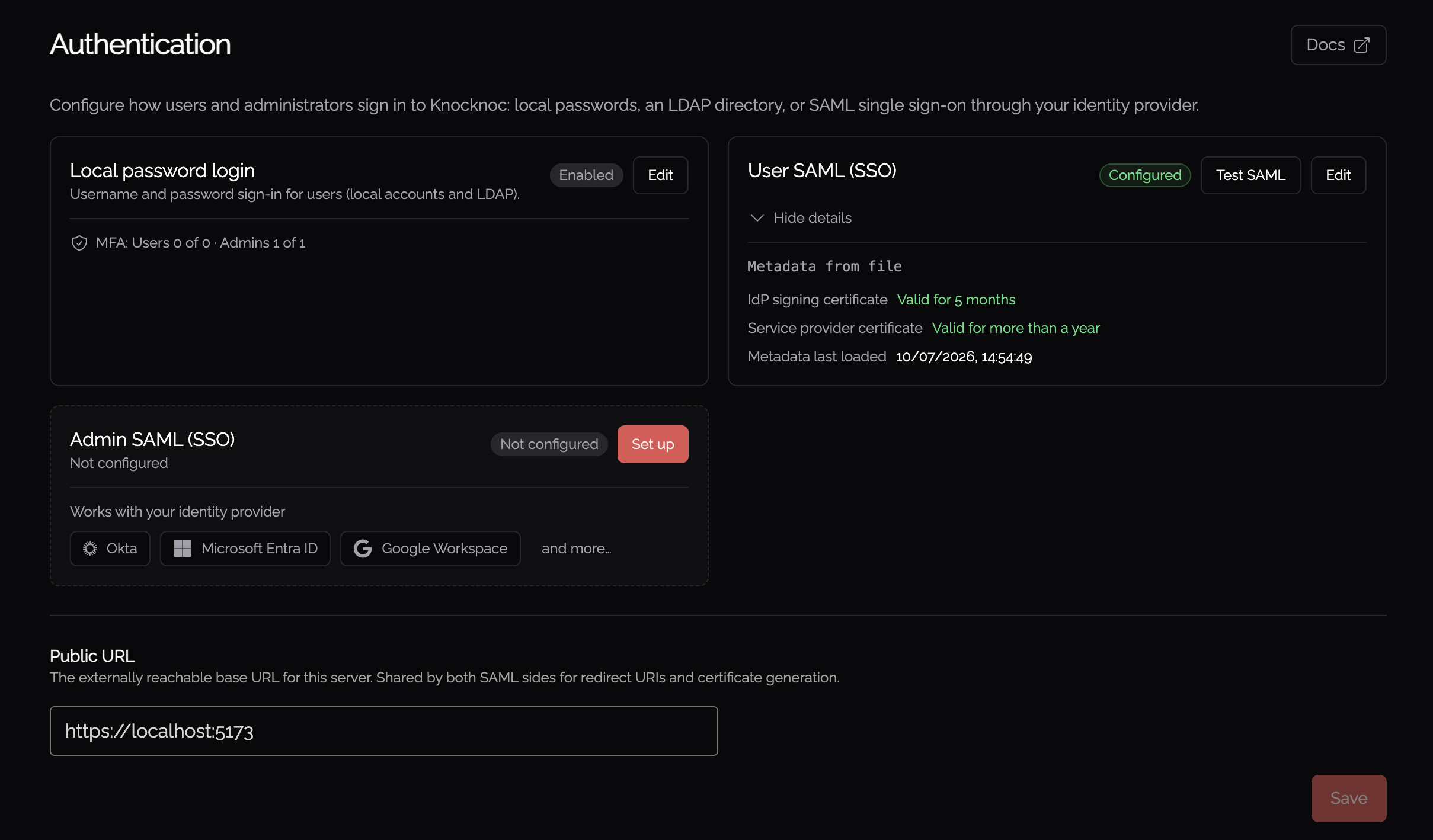
Settings -> Authentication opens with a summary of every sign-in method, so you can see the current state at a glance: local password login (with a count of how many users and admins have MFA), LDAP, and the User and Admin SAML integrations (Configured or Not configured, plus the admin provisioning mode).
For each configured SAML side the summary shows the IdP signing certificate and the Service provider certificate with how long each is valid, and when the metadata was last loaded. Use Reload metadata to re-fetch the latest metadata from your identity provider's URL and refresh these details.
Testing your SAML configuration
Knocknoc can run a live SAML round-trip against your identity provider without creating a user or a session, so you can confirm the integration and see exactly what the IdP sends before relying on it. All tests are launched by a signed-in admin from Settings -> Authentication, and run against your saved configuration, so save any changes first.
- Test SAML sits at the top of both the User and Admin SAML boxes. It signs you in through the relevant identity provider and returns to a result dialog showing the NameID and every attribute the IdP returned. The user test additionally lists the Knocknoc groups that user would be assigned on login.
- Test SAML group sits inside the Admins assigned to a SAML group option. In addition to the round-trip, it reports whether your account is in the configured admin group and shows the exact group attribute and values received: the quickest way to discover the right values to enter.
Each test redirects you through the IdP and back to a result dialog. The raw attributes are collapsed and expandable. Because no session is created, the tests are safe to run at any time and never log you in as the tested identity.
SAML session duration
A user's session length can be driven by the SAML assertion. For a new user, Knocknoc uses an explicit per-user override if one is set, otherwise the duration supplied in the assertion, otherwise a default of 420 minutes (7 hours). For an existing user, if the identity provider omits the duration attribute Knocknoc keeps that user's already-configured duration rather than resetting it.
SAML-only mode, disabling local users
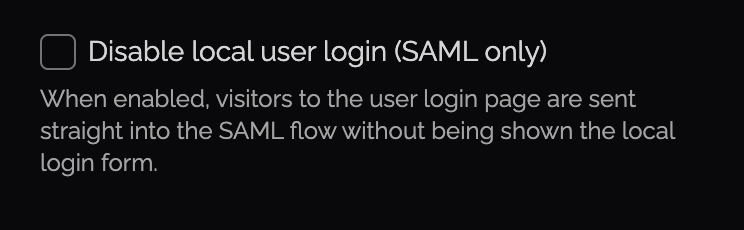
You can disable local-users, forcing SAML only, within the Admin -> Settings page. Disable anytime if local-users are required.
When enabled, this automatically forwards users to your IDP to streamline access and avoid confusion during major rollouts. This can be combined with the "Instant referrer redirect (no countdown)" option which redirects users straight to the service they were trying to access. Goes hand-in-glove with the SAML-only login feature mentioned above, resulting in a fast but secure redirect experience, granting just in time network access without friction.
Admin provisioning
Once admin SAML metadata is configured, Settings -> Authentication -> Admin provisioning controls which SAML users are allowed in as admins. Select at least one option:
- Predefined SAML Admins (default): only users that already exist as admins in Knocknoc can sign in.
- Admins assigned to a SAML group: any user whose assertion carries the configured group is signed in, and is created as an admin automatically the first time they log in. You configure:
- Admin group: the group value your IdP sends that grants admin access. Matched case-insensitively.
- Group attribute name: the SAML attribute that carries group membership. Defaults to
groups, the same attribute used for user groups.
Group membership is re-checked on every login. A user who loses the group (or, once group mode is turned off, who is not also a predefined admin) is refused at the next login. Their admin account is left untouched: Knocknoc does not disable or delete it, the user simply cannot sign in until they regain access. The refused user sees a clear message on the admin login page ("Access refused: your account is not a member of the required SAML group. Contact an administrator."). The message is deliberately generic and does not indicate whether the account exists.
What is SAML anyway?
SAML is an open standard for exchanging authentication data between parties, specifically between an identity provider and a service provider. An XML-based framework for communicating user authentication, entitlement, and attribute information. It allows secure domains to exchange user data, enhancing the ability to support single sign-on (SSO) – a process that allows users to access multiple services with one set of credentials.
Key components of SAML
- Identity Provider (IdP): An entity that creates, maintains, and manages identity information while providing authentication services to service providers (e.g., OKTA, EntraID, Jumpcloud).
- Service Provider (SP): An entity that provides services, like web applications, and relies on the IdP for authentication (e.g., Knocknoc).
- Assertion: A package of information that supplies one or more statements made by the IdP about a user. This can include attributes about the user, authentication information, and entitlements.
SAML assertions
Assertions are the key element of SAML. They are XML documents that contain:
- Authentication Statement: Information about the authentication act (e.g., when and how the user authenticated).
- Attribute Statement: Information about the user (e.g., user’s name, email).
- Authorization Decision Statement: Information about what the user is allowed to do.
SAML protocols, bindings and profiles
SAML defines a set of protocols for requesting and delivering assertions:
- Authentication Request Protocol: Used by SPs to request authentication from an IdP.
- Assertion Query/Request Protocol: Allows SPs to request specific assertions.
- Bindings: Mechanisms used to transport SAML messages between parties (e.g., HTTP Redirect, HTTP POST and SOAP).
- Profiles: Methods of combining various SAML elements (assertions, protocols, and bindings) to support specific use cases. The most common is the Web Browser SSO Profile.
Security considerations
SAML is a more secure way to authenticate users, as the SP never receives the password of the user. However, security is paramount in SAML implementations. Key considerations include:
- Message Confidentiality and Integrity: Using digital signatures and encryption to protect messages. Knocknoc signs messages with a separate certificate.
- Trust Establishment: Ensuring that messages are exchanged between trusted parties, often through X.509 certificates. You will need trusted SSL certificates when working with SAML.