
High availability
A Knocknoc deployment has three parts: the Server (web app), its Database (PostgreSQL), and one or more Orchestration Agents. How you run the first two decides your availability. The Agents are resilient by design (see below).
One thing makes Knocknoc forgiving here: a Server outage does not revoke access. Agents keep enforcing existing grants and reconnect on their own, so a short outage during maintenance or failover is harmless. You do not need zero-downtime rolling upgrades to stay safe.
Choosing a topology
These are example deployments, not fixed products. The web tier, the database, and the load balancer are independent choices, so mix them to suit your environment. Web nodes can run hot/hot or hot/cold. The database can live on a web node, on a dedicated host, or on a managed service (DBaaS). Replication is optional, and where you do replicate, the pair is hot/warm rather than hot/hot: only one PostgreSQL ever accepts writes. Read Database high availability below before you build a replicated pair. The patterns here are common starting points, not the only supported ones.
| Topology | Web tier | Database | Best for |
|---|---|---|---|
| Single node | One host | Local, on the same host | Smaller deployments, or where host-level failover is enough |
| Shared-primary | Multiple, behind a load balancer | On a web node, exposed to the others | Growing from one node without separate DB infrastructure |
| Multi-node | Multiple, behind an external LB/WAF | Dedicated host or DBaaS | Keeping the database managed independently of the web tier |
| All-in-one | One host, with a local reverse-proxy Agent | Local | Isolated "in a box" deployments needing in-line HTTP/TCP protection |
Single node
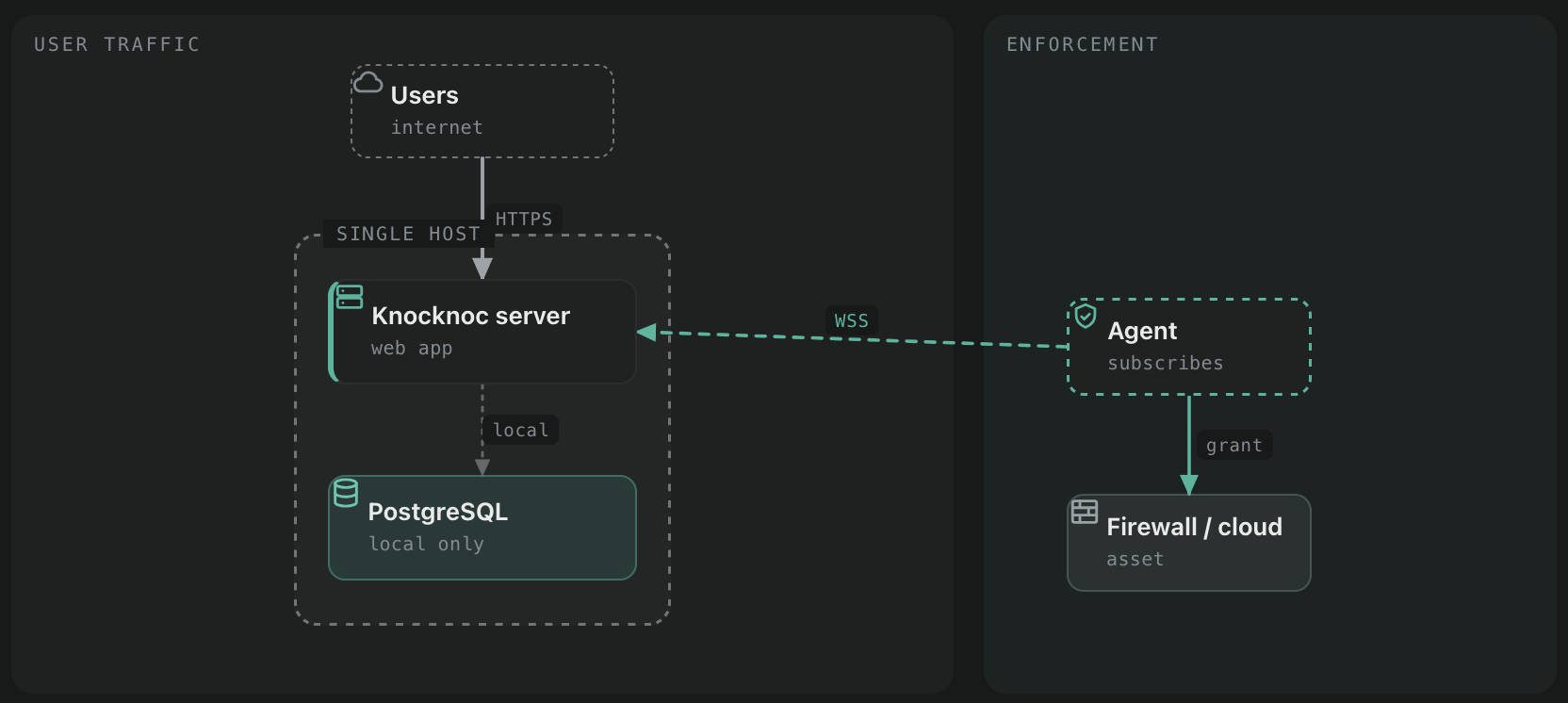
Web app and PostgreSQL on one host. PostgreSQL is local only and not externally reachable. Simple to run and the default after a standard install. Scale it vertically.
Shared-primary
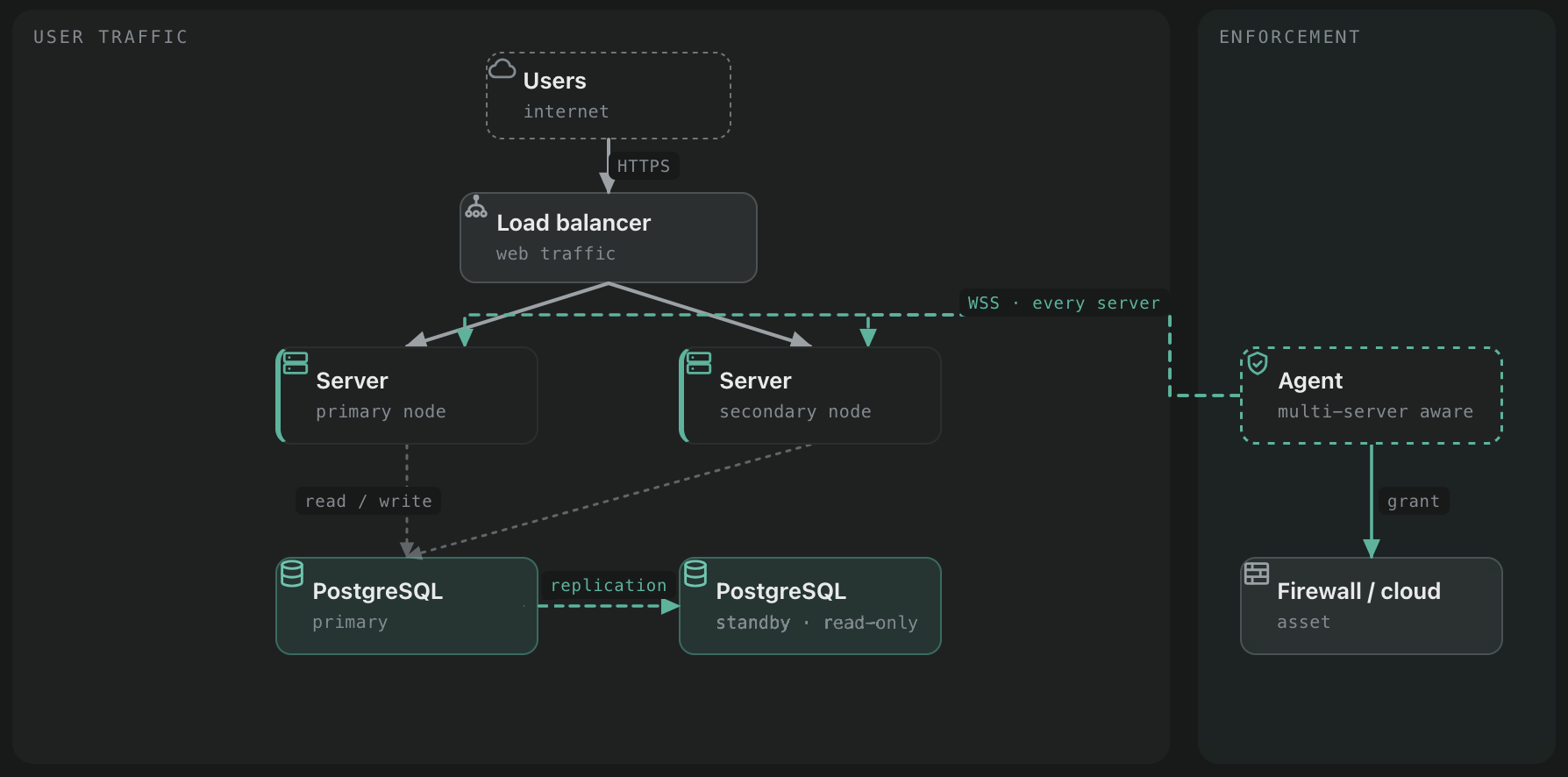
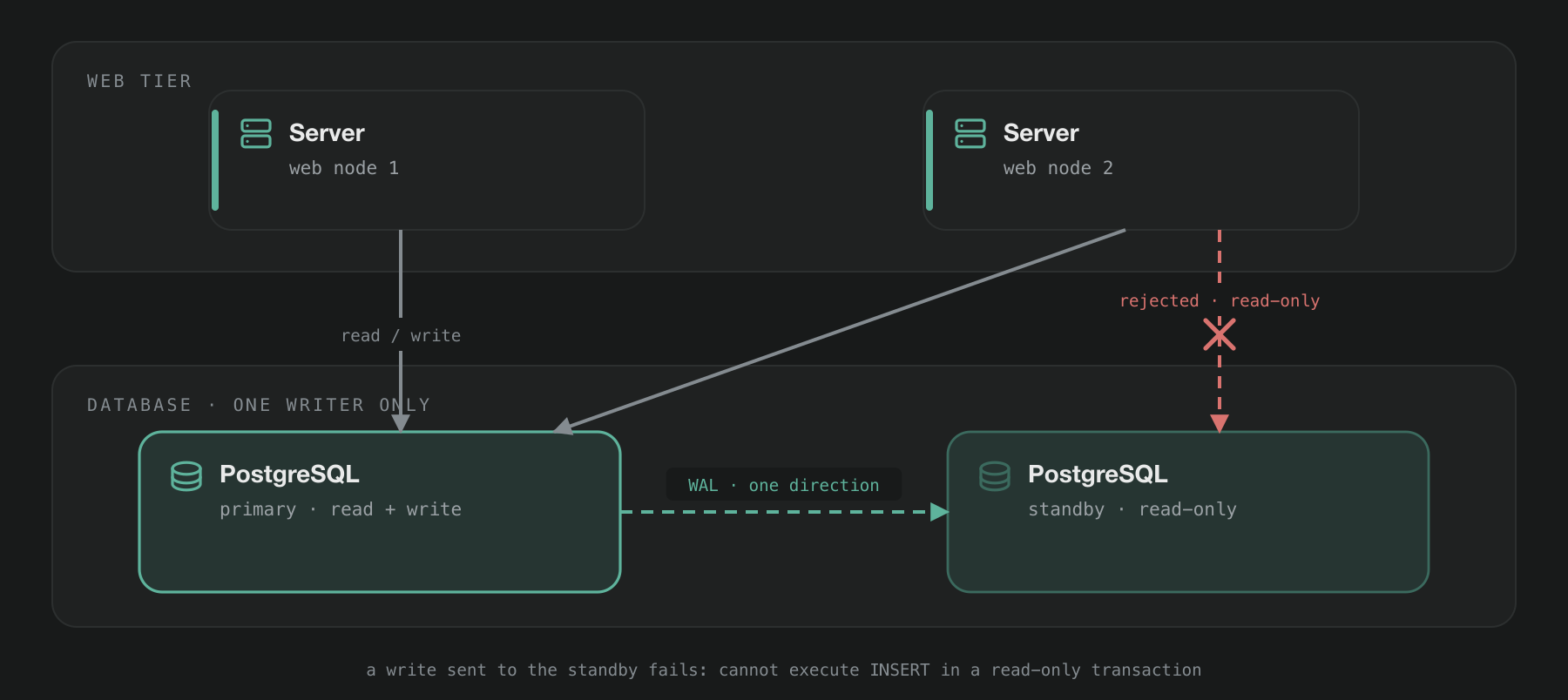
Several web apps share one database that runs on (and is exposed from) one of the web nodes. A load balancer spreads web traffic across the nodes. Run them hot/hot or hot/cold as you prefer. This is the natural next step from a single node: Knocknoc can expose its existing local database without you provisioning separate infrastructure. Add a replicated standby (shown in the diagram) for database failover, or point the nodes at a DBaaS instead. Replication and the standby are optional. A standby is read-only until you promote it, so every web node connects to the primary and none of them to the standby.
Multi-node
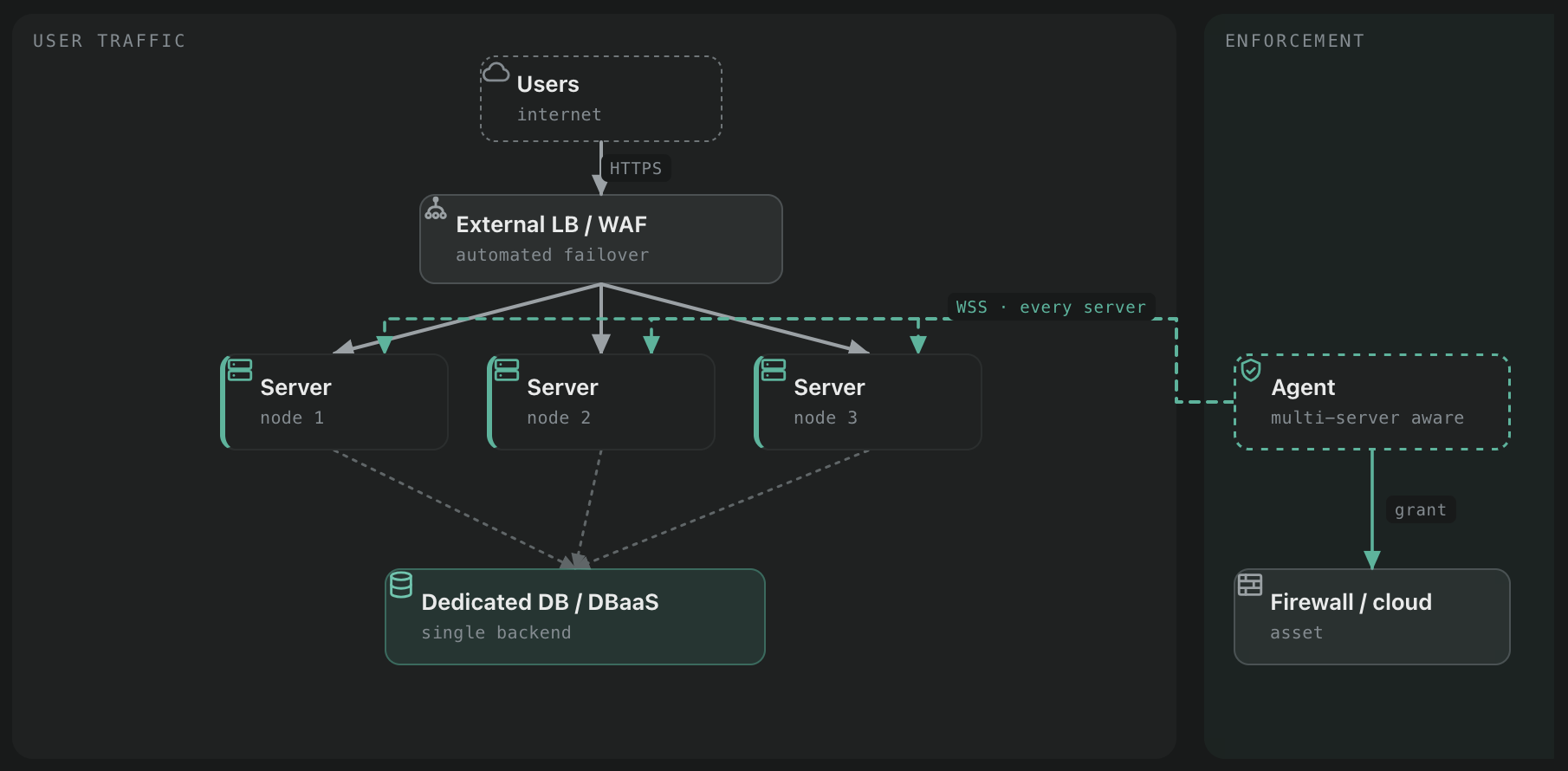
Several web apps run against a single database backend that lives off the web tier, on a dedicated host or a managed service (Amazon RDS, Google Cloud SQL, Azure Database, Digital Ocean, Heroku, and similar). An external HTTP load balancer or WAF spreads web traffic and can fail over on health or performance. Run the nodes hot/hot or hot/cold. Keeping the database separate lets you manage and scale it independently of the web tier, and lean on your provider's database HA if you use a managed service. Every web node uses the same writable endpoint. On a managed service that is the primary or writer endpoint, not a read replica endpoint.
All-in-one with reverse proxy
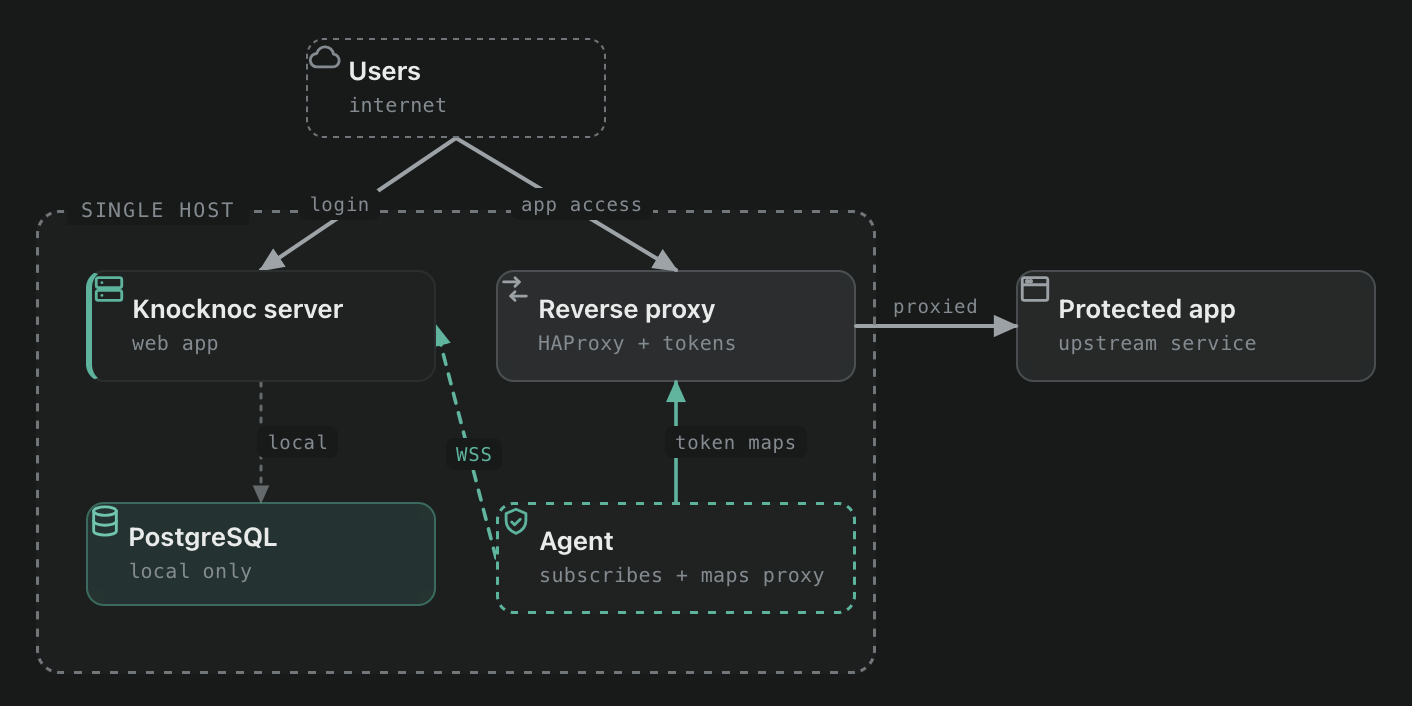
Web app, database, and a local Agent in reverse-proxy mode on one host. The Agent provides in-line HTTP/TCP protection in front of a protected app while also orchestrating external systems, host firewalls, or cloud control layers. A self-contained way to drop Knocknoc into an isolated environment.
Agent high-availability
Agents are resilient without special configuration:
- Deploy them next to what they orchestrate. Agents do not need Server-to-Agent connectivity. They subscribe to the Server for instructions, so place them alongside the assets they manage. See the Agent documentation.
- One Agent connects to every web node. An Agent is multi-server aware, so point a single Agent at all of your web nodes to keep logins applied promptly. You do not run one Agent per Server.
- Run several Agents for redundancy. Where multiple Agents run, every Agent receives each grant job, so grant and revoke still happen if one Agent is down.
Database high availability
A replicated Knocknoc database runs hot/warm. One PostgreSQL takes every read and write. A second replays its write-ahead log continuously and stands ready to take over, but stays read-only until you promote it, so there is exactly one writer at any moment.
The web tier above it is a separate choice. Knocknoc web nodes hold no state of their own, so run as many of them as you like and point all of them at that one primary.
| Role | Accepts | What it is doing |
|---|---|---|
| Primary (hot) | Reads and writes | Serves every Knocknoc web node. The only node that may be written to. |
| Standby (warm) | Reads only | Running, connected to the primary, and continuously replaying its write-ahead log. Promotable in seconds, but rejects every write until you promote it. |
Promotion is deliberate. Knocknoc doesn't elect a primary and PostgreSQL won't promote itself, so failover happens when you run it. Replication travels one way, primary to standby, and a second writer would let the two copies diverge during a network fault, which for access grants and live sessions is worse than a short outage.
Setting it up
Build the pair, then point DBURL on every web node at the primary, using a DNS name rather than its address. BYO PostgreSQL covers the connection string format:
DBURL = "postgres://knocknoc:[email protected]:5432/knocknoc?pool_max_conns=50"Keep the TTL on db.example.com short, 60 to 300 seconds. Failover is then one DNS change rather than an edit on every web node, and nothing in the Knocknoc configuration has to know which host is currently primary. Restart the web nodes after the change so pooled connections are rebuilt against the new host.
PostgreSQL replication and failover has the full build, the backup configuration and sample failover scripts.
If you would rather not run the pair yourself, a managed service does the same thing with the promotion handled for you. Amazon RDS Multi-AZ, Azure Database for PostgreSQL and Google Cloud SQL HA are all hot/warm underneath. Point DBURL at the writer endpoint and none of the rest applies.
Failing over
- Stop Knocknoc on the web nodes.
- Stop PostgreSQL on the primary so it cannot take another write.
- Promote the standby.
- Move
db.example.comto the new primary and restart the web nodes. - Rebuild the old primary as a standby of the new one.
Failing back later is the same procedure in the opposite direction. Once step 5 is done both nodes are equally valid as primary, so there's no need to hurry it.
Setting up multiple web nodes
To go from a single node to a shared-primary deployment, expose the existing database, then add web nodes that connect to it.
1. Expose the database on the primary
Run knocker exposedb --init on the primary host. It binds PostgreSQL to 0.0.0.0:5432, creates a user with a random password, links that user to your existing database using the connection string from your Knocknoc config, and prints the connection string to use on the other nodes. (You can also configure PostgreSQL for external access by hand if you prefer, though exposedb does it for you.)
$ sudo /opt/knocknoc/knocker/knocker exposedb --init
Copy the connection string from the output. You will need it on each secondary node.
2. Allow-list the secondary nodes
External access is denied until you allow each source IP. Add the secondary web nodes (and any other trusted sources). List or remove entries as needed.
$ sudo /opt/knocknoc/knocker/knocker exposedb --add "203.0.113.7/32"
$ sudo /opt/knocknoc/knocker/knocker exposedb --list
$ sudo /opt/knocknoc/knocker/knocker exposedb --remove "203.0.113.7/32"
A node that is not on this list cannot connect to the database. Run knocker exposedb --help for all options, including --conn for a non-default connection string.
3. Install the web nodes
Install Knocknoc on each secondary node. Bind it to a reachable address (for example 0.0.0.0:8756), then at the database question choose option 3 to connect to the existing remote Knocknoc database (option 1 is a new local database, option 2 is a fresh external database). If the node sits behind a load balancer or reverse proxy, set TrustedForwarders to that proxy's address so client IPs are read correctly. The default is safe when there is no proxy in front, and you can change it later:
Enter IP and port to listen on (default: 127.0.0.1:8756): 0.0.0.0:8756

If you're running behind a reverse-proxy, set the trusted forwarders.
Default is safe if not. You can adjust this later, see Server Install on https://docs.knocknoc.io
Enter TrustedForwarders (default: 127.0.0.1/32): 192.168.100.1/32

Knocknoc stores its data in PostgreSQL, and you can choose how to configure the database.
You have three options:
  1) Use a local PostgreSQL installation (default)
  2) Use a new external or preconfigured PostgreSQL database
  3) This Server is a web node only, use pre-existing external Knocknoc database

Option 1, 2, or 3? (default is 1): 3

Enter pre-existing external Knocknoc database connection string: postgres://knocknoc:[email protected]:5432/knocknoc
If a node cannot reach the database, confirm its IP has been added with exposedb --add on the primary.
The connection string is the primary's. If you run a replicated pair, do not give a node the standby's address here. It will connect, then refuse every write, so the node comes up and nobody can log in. See Database high availability above.
4. Front the nodes with a load balancer
Distribute inbound traffic across the web nodes with a load balancer. You can set up HAProxy locally with Knocker or use your own LB/WAF. Persistence is normally handled by a load-balancer cookie, as is standard practice.
Health-check each node on the /_status route (for example https://example.knocknoc.io/_status). This is required, not optional: the route reports whether a server is up and whether its version is in step with the database, so the load balancer can pull a node that is down or out of date out of rotation on its own. It is also what makes the upgrade process below safe.
Upgrading servers in an HA deployment
When multiple servers share one database, you may upgrade them one at a time, and decide which servers you would like available to users during the process. The first server you upgrade updates the shared database to the new version. Older servers still in rotation are then out of step with that database, which risks minor errors. The steps below avoid that.
Server downtime during an upgrade is a few seconds at most, and access to protected resources is unaffected throughout.
1. Check server status and settings
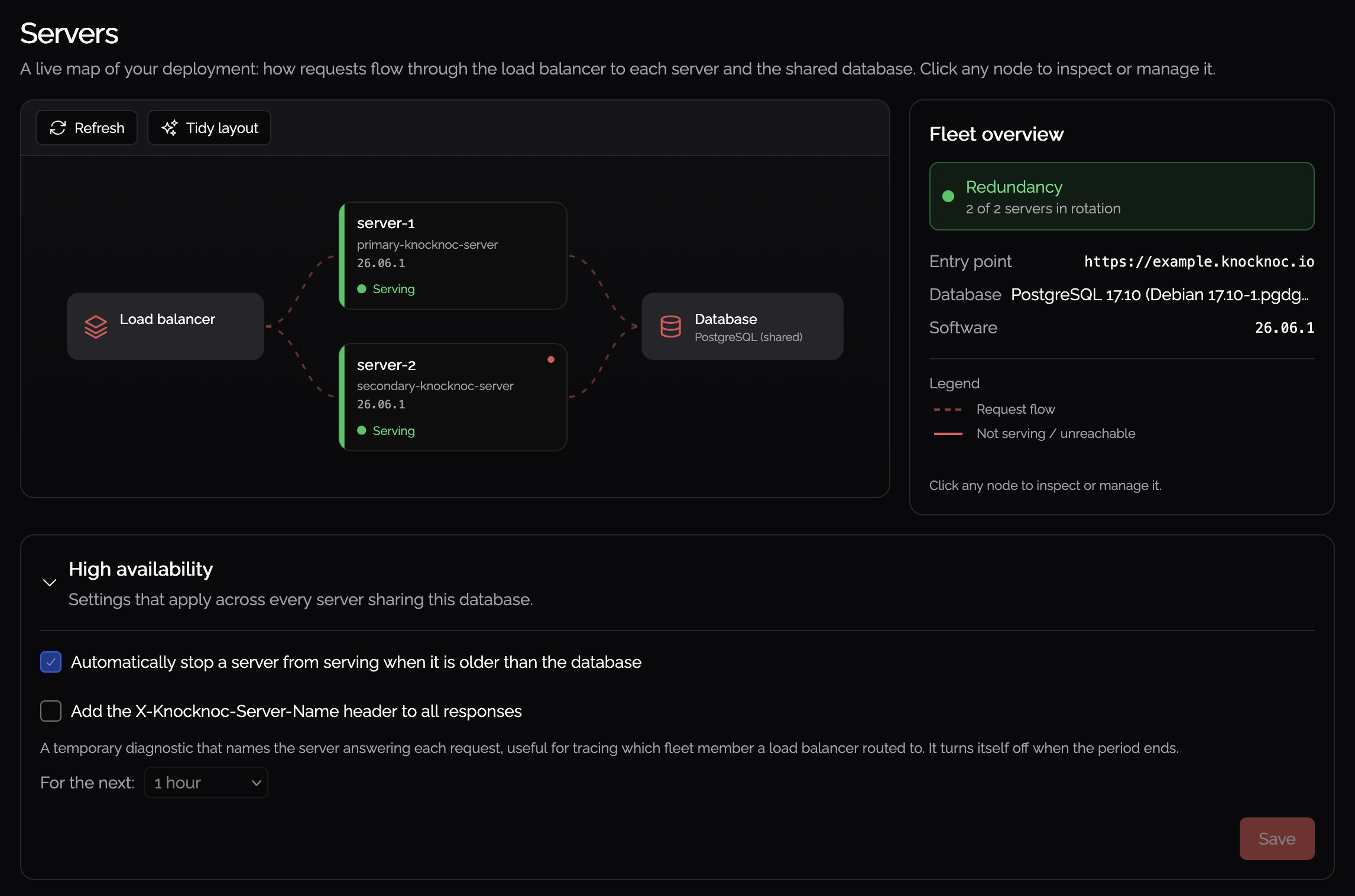
In the admin portal, confirm every server sharing the database is listed and online. A missing or offline server points to an existing problem. Fix it before upgrading.
Then check two things:
- If you would like to ensure there is no chance for a server to serve incorrect data, enable the Automatically report negative on the load balancer health check for a server when it is on an older version than another server setting. This stops an out-of-date server from serving once the database has moved to a newer version. For some users, it may be preferable to have a small window with potential minor errors exposed to users as opposed to denying traffic to all but one server.
- Your load balancer health-checks each server on the
/_statusroute (see above). This process relies on it to pull out-of-date nodes out of rotation.
2. Upgrade your server
Upgrade any of the servers, following your organization's standards. It migrates the database as it restarts. See Updates and upgrades for the upgrade itself.
3. Upgrade the remaining servers
Upgrade each remaining server the same way, ensuring they are correctly brought back into rotation. Once every server is on the new version, the fleet is fully in service again.