
v25.12
Knocknoc 25.12
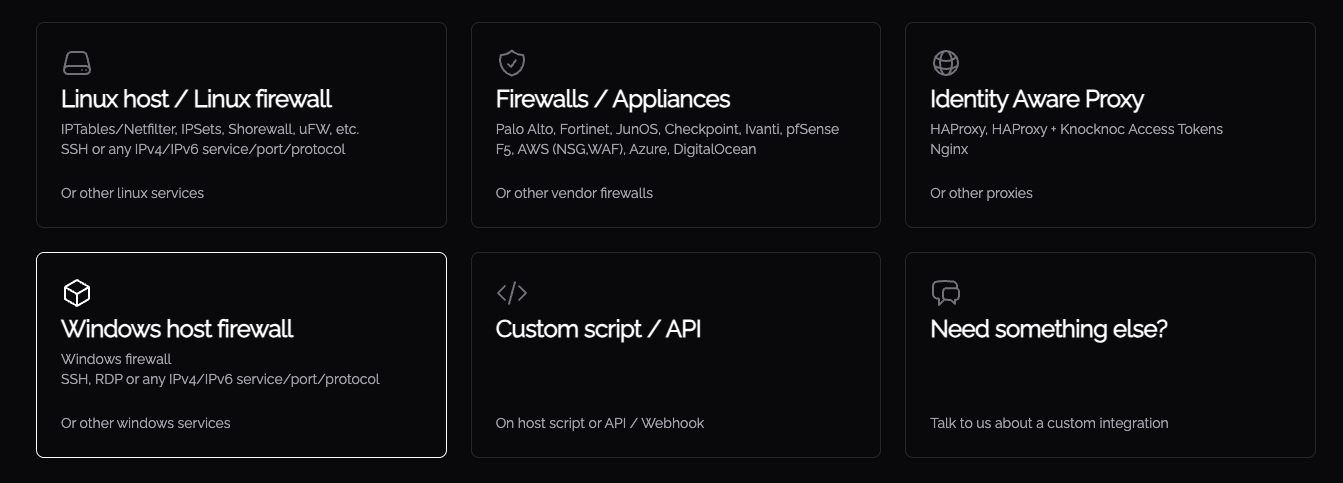
Knocknoc 25.12 is a Windows-first release focused on making Just-In-Time (JIT) access easier to deploy and operate across Windows environments. The headline upgrade is the Windows Agent now managing the local Windows Firewall for true on-host network allowlisting access (for example: JIT RDP, with out-of-band management), while continuing to orchestrate third-party firewalls such as Fortinet, Palo Alto etc - meaning no Linux for teams who operate atop Windows environments.
But that's not all! We've packed in other features like break-glass access for Administrators, Agents rely less on Server connectivity for those spotty radio environments, improved Admin experience for deploy/setup and TLS/SAML management, integrations with SonicWall, improved AWS/EC2 and Palo Alto/Panorama orchestrations, web-redirects and auto-browse means less SSO clicks for users, more bookmark-friendliness and overall it makes access smooth and dare we say joyful especially when using the reverse-proxy mode. Big thanks to our customers who shared ideas like enabling SAP protocol handler support for thick-clients - click, auth, SAP! Remove your network attack surface and shift to network allowlisting today!
🪟 Windows Orchestration Agent
- Dynamic Microsoft Windows Firewall control (e.g. just-in-time RDP, FTP/SFTP network allowlisting)
The Windows Agent can now manage time-bound Windows Firewall rules on a target host, enabling JIT network-level access directly to Windows services like RDP (or other TCP/UDP ports) only when a user is authenticated. The same out-of-band, host->server control mechanism means your Windows servers are not exposed to inbound management control, enabling zero-trust & micro-segmentation at the network and client/host layer without fuss. Read about managing the local Windows firewall here, or installing the Windows agent here. - Windows management of Fortinet / Palo Alto / EC2 / Azure / Sonicwall / ...
You can now orchestrate third-party firewalls from Microsoft Windows using the Knocknoc Windows orchestration agent. Spin up the Knocknoc SaaS server and remove external attack surface in 15 minutes using the Windows Agent and an existing in-line or appliance based firewall. Simple but very effective. Install the Windows Agent here.
🧠 Smart Access & User Experience
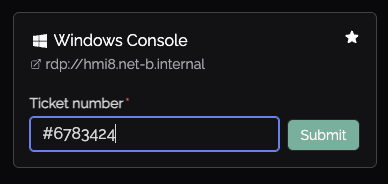
- Ticket number capture, to justify access
Knocs can now require a ticket reference number, forcing those accessing to provide data to justify their access. These are not yet in an approval workflow, but are logged against the users access request. Great for third-parties, contractors or those working on their assets within your environment, and you want to capture what ticket or job number their access related to.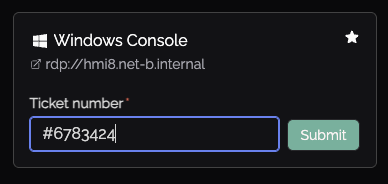
- Redirecting and streamlining logins
The Knocknoc reverse proxy mode can now redirect users back to your Knocknoc Server, which, with a single-click and SSO/MFA, the user is taken to the original destination URL they attempted to access, but this time Knocknoc grants their access. Great for bookmarks or shared links, reduces user friction while still ensuring a high degree of network allowlisting control. - SAP, thick-client and protocol handlers
Innovative customers are adding protocol handlers on their SoE to automatically load thick-client software, like SAPClient and others, and automatically 'browsing' users to these after a successful Knocknoc login. This streamlines just in time network level access exposure/control for non-web access, and results in a smooth and guided user experience.
🔌 Integrations, Sonicwall and more
-
SonicWall integration upgrades (Active / Passive / DEAG / Passive+)
SonicWall support gets a major uplift with expanded orchestration modes: Active, Passive/DEAG and Passive+ giving you greater flexibility in supporting broad deployments. Read more here. - AWS EC2 improvements
You've been making your AWS EC2 security control groups dynamic for a while now, but we've improved the Admin experience and made it simpler. See here. Also works from the Windows Agent with the AWS CLI installed. - Palo Alto and Panorama improvements
You can now split the Panorama and Palo Alto firewall orchestration instructions out, to send a User-ID value to the Panorama, but orchestrate a local Palo Alto firewall directly. This updates your Pano global data set for user information, but applies the firewall directly - without relying on the Panorama instructing an underlying firewall.
🛠 Admin Controls
- Break-glass Admin / Manual access Mode (time-boxed)
We've introduced a break-glass style Admin feature for controlled troubleshooting and emergency workflows. This mode is time-bound to strictly 20 minutes to reduce risk while still enabling operational flexibility. Sometimes people lock themselves out, it happens, default-deny is a good thing and we want you to be brave and get there - so this helps. - Revocation in a disconnected state
Networks can be severed or otherwise unreliable, and you still want the granted-access to be revoked, without relying on network traffic between Agents and Servers. With this release, we've added an on-agent stateful manager of expiring access grants, to ensure no grant revocation/removal is missed, regardless of unreliable internet between your Agents and your Server. When they eventually reconnect, the new-state is shared and everything balances. - User and Admin sessions, active IP addresses
User and Admin IP addresses are now more visible, allowing you to determine who is logged in from where. You can also terminate these sessions selectively. -
Server TLS/SSL cert & key management via Admin UI
Server TLS/SSL keys and certificates can now be uploaded and managed via the Admin interface, simplifying certificate operations. Note: in multi-web / multi-endpoint setups there may be multiple web endpoints to update; in some deployments it may still be best practice to continue managing server.crt / server.key directly. High-availability is worth a read too. - System-generated SAML certificates downloadable in Admin UI
If Knocknoc generates SAML certificates for your configuration, Admins can now download those certificates directly from the UI, making setup and rotation workflows more straightforward.
🧱 High Availability (HA)
- BYO databases (e.g., Postgres RDS)
Installation has improved for BYO database cases, be it an existing external source or a fresh database. See BYO. -
Externalize your existing database with ease for enabling for hot/hot deployment patterns
You can now easily externalise the database to support higher-availability deployment patterns including hot/hot scenarios (see HA guidance) even for single-master nodes. The Knocker utility handles this for you, including IP address allowlist trust, strong encryption use and more.
🏎️ Performance and other improvements
- API performance
API workflows are now more performant, e.g., SOAR integrations and terminating user/network access, along with NHI/workflow API-based session creation - Agent states
Agent states are more easily understood, offline or outdated agents are now really obvious - Knocknoc Access Token links
The display of KAT tokens on the list-view for end users, has been fixed -
Ubuntu and Debian versions
Ubuntu 25.04 and Trixie formally supported - Logging readability improvements
We're always trying to improve logging, so readability has been increased again
Release date: 10th December 2025
Where do I do the updates?
We intentionally require you to update Knocknoc and any orchestration Agents through your operating system, e.g., Linux package management. Ensuring you have complete control on the timing of upgrades and state of your machine, and intentionally avoid automatically updating.
Follow this guide to upgrade when you're ready.
Self hosting? Converted your database?
If you installed fresh since September 2025, you have nothing to do. Well done.
If you're running an older version or installed months or years ago, there's a chance you need to execute to convert your underlying database technology - as we've moved to Postgres.
This is as simple as running Knocker on your server with 'convertdb' - it takes care of the rest. Backups, testing, rollback, it does it all. But you have to do it, we didn't want to force it on you.
Run through the ConvertDB process by following this guide.
Please perform this if you have not already, as your future version upgrades won't be supported and you'll lose access to new functionality.
🛠 V25.12.2 & V25.12.3
- Manual access (SQLite users)
Improvements for manual access on older databases - Stale configuration
Cleansing of stale configuration data - Passive+ improvements
Improvements to Passive+ operating modes for Palo and Sonicwall - Reduced logging of misconfigured backends
Reduced impact of logging revoked grants for misconfigured back-end integrations
Release date: 17th December 2025