
201102 - Failed to Delete Address Object
Agent error code #201102 indicates that the Knocknoc agent was unable to delete an address object from the SonicWall firewall.
This error occurs when:
- The API user does not have permission to delete address objects
- The address object is still referenced by a firewall rule or another address group (outside of Knocknoc's managed groups)
- The SonicWall API returned an unexpected error
Steps to Resolve
Verify API User Permissions
The API user must have sufficient permissions to delete address objects:
- Log into the SonicWall management interface
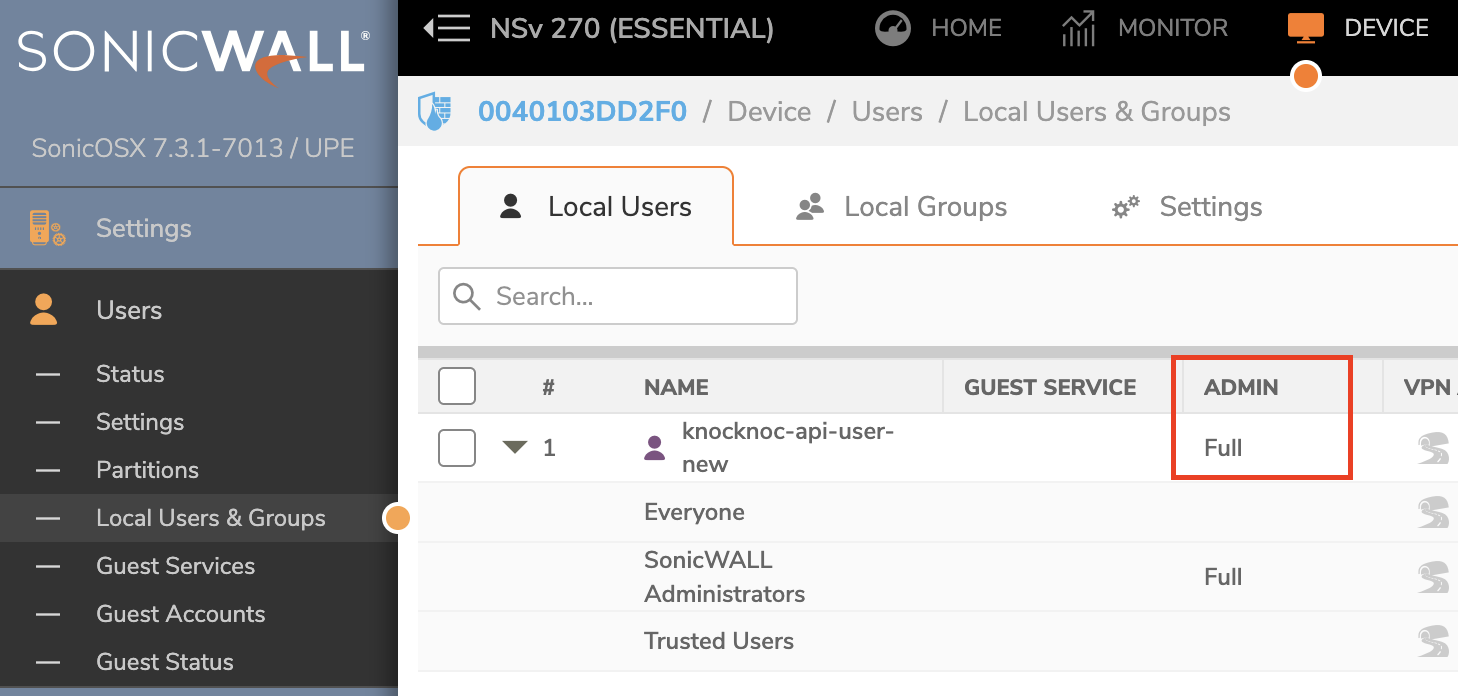
- Navigate to Device > Users > Local Users & Groups
- Verify the API user has administrative privileges or appropriate write permissions for address objects
- If the user belongs to a restricted group, consider assigning them to a group with full administrative access
For more details on API user configuration, see the SonicWall backend setup guide.
Check for Object References
SonicWall prevents deletion of address objects that are still in use. If the address object is referenced elsewhere:
- In the SonicWall management interface, navigate to Object > Match Objects > Addresses
- Search for the address object (Knocknoc names them
kk-<ip>for a single address andkk-<ip>_<prefix length>for a network, and a long IPv6 source askk-followed by 29 hexadecimal characters) - Check if the object is referenced by any firewall rules or address groups outside of the Knocknoc-managed groups
- Remove any external references before attempting to revoke access again