
PostgreSQL replication and failover
You can run the Knocknoc database on a pair of PostgreSQL servers. If one server fails, you switch to the other in a few minutes instead of restoring from a backup. This guide covers building the pair, backing it up, and failing over from one server to the other.
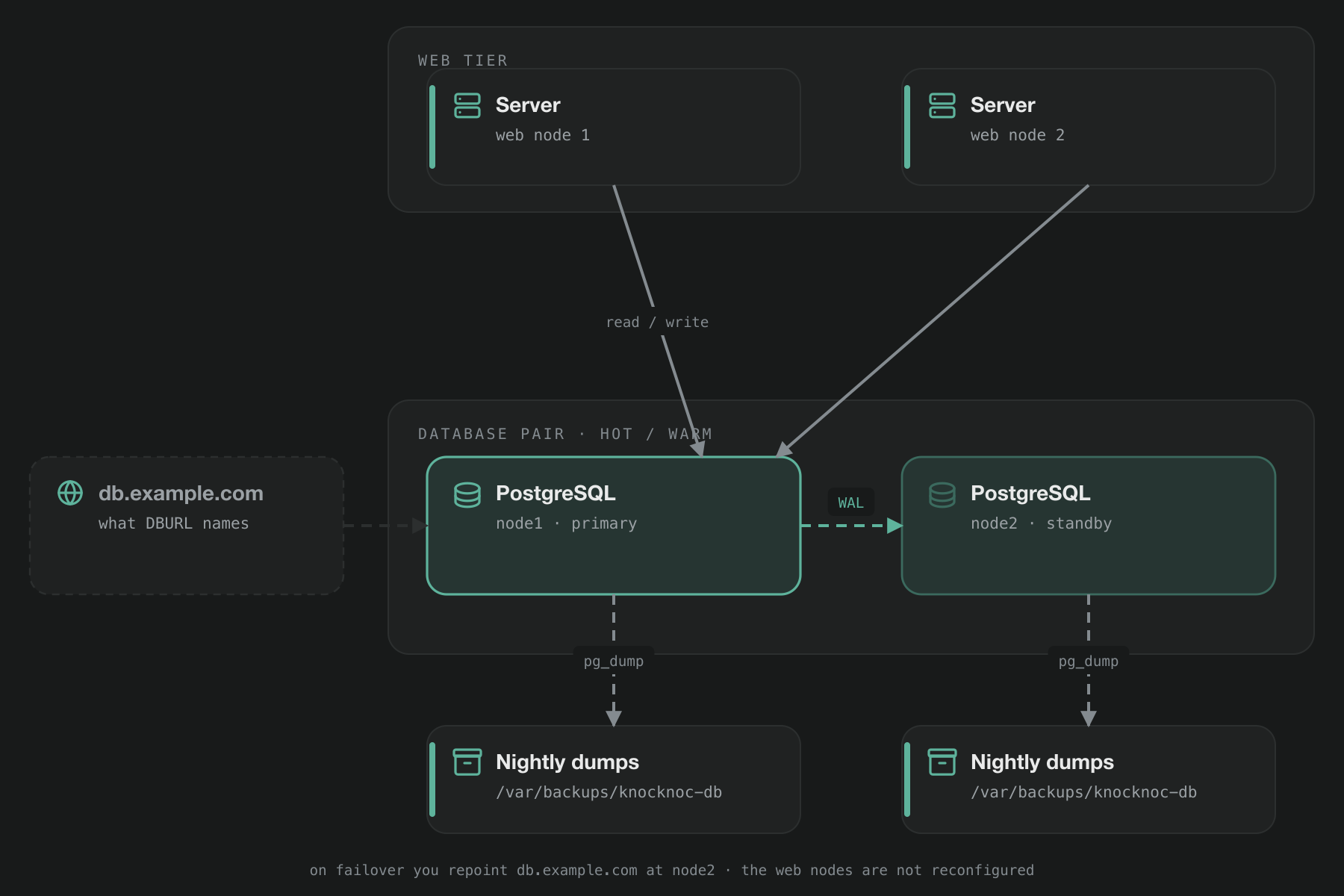
The pair is hot/warm. One server, the primary, handles every read and write from every Knocknoc web node. The other, the standby, keeps an up-to-date copy of the primary and stays read-only until you promote it. Always point your web nodes at the primary. A web node connected to the standby can't log anyone in. The High availability page explains why.
If you use a managed database such as Amazon RDS Multi-AZ, or Azure Database for PostgreSQL or Google Cloud SQL with high availability turned on, you don't need this guide. The provider runs the pair for you. Point DBURL at the writer endpoint as described in BYO PostgreSQL, and use the provider's own backups.
What you'll build
| Host | Address | Role |
|---|---|---|
node1 | 10.0.0.1 | Initial primary |
node2 | 10.0.0.2 | Initial standby |
db.example.com | CNAME or A, 60s TTL | The name in DBURL. Point it at whichever server is the primary. |
Replace these with your own hostnames and addresses. The examples use PostgreSQL 15. Other versions work too, with the version number in paths and package names changed to match.
In the examples, the Knocknoc web nodes run on their own hosts. They can also run on the two database servers, which is how a shared-primary deployment is set up. If you already have a shared-primary deployment, see Adding a standby to a shared-primary deployment.
Distribution differences
| Debian / Ubuntu | RHEL / Rocky / Alma | |
|---|---|---|
| Packages | postgresql-15 | postgresql15-server |
| Data directory | /var/lib/postgresql/15/main | /var/lib/pgsql/15/data |
| Configuration | /etc/postgresql/15/main/ | /var/lib/pgsql/15/data/ |
| Service | postgresql@15-main | postgresql-15 |
| Promote | pg_ctlcluster 15 main promote | pg_ctl promote -D <datadir> |
| postgres user's home | /var/lib/postgresql | /var/lib/pgsql |
The commands on this page use the Debian paths and service names. On RHEL, swap in the values from this table.
Building the pair
1. Install on both nodes
Debian or Ubuntu:
sudo apt update
sudo apt install -y curl ca-certificates

sudo install -d /usr/share/postgresql-common/pgdg
sudo curl --fail -o /usr/share/postgresql-common/pgdg/apt.postgresql.org.asc \
    https://www.postgresql.org/media/keys/ACCC4CF8.asc

sudo tee /etc/apt/sources.list.d/pgdg.sources > /dev/null <<EOF
Types: deb
Enabled: yes
URIs: https://apt.postgresql.org/pub/repos/apt
Suites: $(. /etc/os-release && echo $VERSION_CODENAME)-pgdg
Components: main
Signed-By: /usr/share/postgresql-common/pgdg/apt.postgresql.org.asc
EOF

sudo apt update
sudo apt install -y postgresql-15 postgresql-client-15 postgresql-contrib-15
sudo systemctl stop postgresql@15-main
RHEL, Rocky or Alma:
sudo dnf install -y https://download.postgresql.org/pub/repos/yum/reporpms/EL-9-$(uname -m)/pgdg-redhat-repo-latest.noarch.rpm
sudo dnf -qy module disable postgresql
sudo dnf install -y postgresql15-server postgresql15-contrib

sudo /usr/pgsql-15/bin/postgresql-15-setup initdb
sudo systemctl enable postgresql-15
sudo systemctl stop postgresql-15
If these repository URLs stop working, check postgresql.org/download for the current ones. Leave PostgreSQL stopped on both nodes for now.
On RHEL, run sudo dnf -y upgrade before you start. The PostgreSQL repository only supports recent RHEL 9 releases, and the install fails on older ones. The systemctl enable line makes PostgreSQL start again after a reboot. RHEL doesn't do this by default. Debian and Ubuntu do.
2. Configure PostgreSQL on both nodes
Add these lines to the end of postgresql.conf on both nodes. Use the same settings on each, so either one can take over as primary:
listen_addresses = '*'
wal_level = replica
hot_standby = on
hot_standby_feedback = on
hot_standby = on lets the standby answer read-only queries, so you can run health checks, monitoring and backups against it. It doesn't make the standby writable. hot_standby_feedback = on stops the primary cleaning up rows that a query on the standby is still reading, so the nightly backup on the standby isn't canceled part way through.
Next, add these lines to pg_hba.conf on both nodes. List each Knocknoc web node and both database nodes by their own address, not by subnet:
# Knocknoc web nodes
host    knocknoc        knocknoc        10.0.0.10/32             scram-sha-256
host    knocknoc        knocknoc        10.0.0.11/32             scram-sha-256
# Replication between the database nodes, in either direction
host    replication     replicator      10.0.0.1/32              scram-sha-256
host    replication     replicator      10.0.0.2/32              scram-sha-256
On RHEL, listing both database nodes is required. RHEL keeps this file in the data directory, so step 4 replaces node2's copy with node1's, and the same file has to work on either node.
Allow port 5432 from the database nodes and the web nodes only. Use the same rules on both nodes. With ufw:
sudo ufw allow from 10.0.0.1  to any port 5432 proto tcp
sudo ufw allow from 10.0.0.2  to any port 5432 proto tcp
sudo ufw allow from 10.0.0.10 to any port 5432 proto tcp
sudo ufw allow from 10.0.0.11 to any port 5432 proto tcp
With firewalld, add rich rules to the default zone:
sudo firewall-cmd --permanent --add-rich-rule='rule family="ipv4" source address="10.0.0.1/32" port port="5432" protocol="tcp" accept'
sudo firewall-cmd --permanent --add-rich-rule='rule family="ipv4" source address="10.0.0.2/32" port port="5432" protocol="tcp" accept'
sudo firewall-cmd --permanent --add-rich-rule='rule family="ipv4" source address="10.0.0.10/32" port port="5432" protocol="tcp" accept'
sudo firewall-cmd --permanent --add-rich-rule='rule family="ipv4" source address="10.0.0.11/32" port port="5432" protocol="tcp" accept'
sudo firewall-cmd --reload
3. Start the primary
On node1, start PostgreSQL, then create the user the standby connects as and a replication slot for it:
sudo systemctl start postgresql@15-main

sudo -u postgres psql <<'EOF'
CREATE USER replicator WITH REPLICATION LOGIN PASSWORD 'CHANGE_ME';
SELECT pg_create_physical_replication_slot('standby_slot');
EOF
The replication slot makes the primary keep any changes the standby hasn't received yet. Without it, a standby that falls behind, for example during a network outage, may find the changes it needs have already been deleted, and you'd have to rebuild it from scratch.
4. Build the standby
On node2, copy node1's database over the empty one created in step 1:
sudo systemctl stop postgresql@15-main

printf '10.0.0.1:*:replication:replicator:CHANGE_ME\n' \
  | sudo -u postgres tee /var/lib/postgresql/.pgpass > /dev/null
sudo chmod 600 /var/lib/postgresql/.pgpass

# Empty the data directory, then copy node1 into it
sudo find /var/lib/postgresql/15/main -mindepth 1 -delete
sudo -u postgres pg_basebackup -h 10.0.0.1 -U replicator -D /var/lib/postgresql/15/main \
  -R -S standby_slot --checkpoint=fast

sudo systemctl start postgresql@15-main
-R sets node2 up as a standby of node1, and -S standby_slot makes it use the slot from step 3. When PostgreSQL starts, it connects to node1 and follows it, instead of starting as a second primary.
5. Check replication
-- On the primary: the standby should be connected, streaming, and at or near 0 bytes behind
SELECT client_addr, state, sync_state,
       pg_wal_lsn_diff(pg_current_wal_lsn(), replay_lsn) AS bytes_behind
FROM pg_stat_replication;

-- On the standby: t means it is a standby
SELECT pg_is_in_recovery();
To be sure, write something. Create a table on the primary, then look for it on the standby a second later. If it's there, replication is working. The standby should refuse any write. If it accepts one, something is wrong, so stop and fix it before going further.
6. Create the Knocknoc database
Run this on the primary only. The standby receives it through replication within a second or two:
sudo -u postgres psql <<'EOF'
CREATE USER knocknoc WITH LOGIN PASSWORD 'CHANGE_ME_TOO';
CREATE DATABASE knocknoc OWNER knocknoc;
EOF
Knocknoc connects to the database by DNS name, so create that record first, with a TTL of 60 to 300 seconds. During a failover you change this one record to point at the new primary, and every web node follows. You don't need to change any Knocknoc configuration.
db.example.com.        60  IN  A  10.0.0.1     ; the current primary
knocknoc.example.com.  60  IN  A  10.0.0.20    ; the load balancer in front of the web nodes
Then install Knocknoc on your web nodes as usual (see Server installation). Choose the Advanced installation mode, because the Standard mode doesn't ask about the database. At the database question, choose option 2 (External or preconfigured PostgreSQL database) on the first web node, because the knocknoc database is still empty. On the other web nodes, choose option 3 (Web node only). On each one, enter a connection string that uses the DNS name rather than an IP address:
DBURL = "postgres://knocknoc:[email protected]:5432/knocknoc"Adding a standby to a shared-primary deployment
1. Match the PostgreSQL version
The standby has to run the same major version of PostgreSQL as node1. The Knocknoc installer uses your distribution's own PostgreSQL, so the easiest way to get a match is to run both servers on the same operating system release. Check the version on both:
# On node1 and node2: the first number is the major version
psql -V
Then install the PostgreSQL server on node2. The commands in this section are for PostgreSQL 15 on Debian. If your version is different, replace 15 with your version number.
# Debian or Ubuntu
sudo apt install -y postgresql
sudo systemctl stop postgresql@15-main

# RHEL, Rocky or Alma
sudo dnf install -y postgresql-server
sudo systemctl enable postgresql
On RHEL, the installer's PostgreSQL doesn't use the paths in the table above. Its data directory, which also holds the configuration files, is /var/lib/pgsql/data, and its service is postgresql.
2. Prepare node1
On node1, allow replication between the two servers, let node1's own Knocknoc connect over the network, and create the replication user and slot:
echo "hot_standby_feedback = on" | sudo tee -a /etc/postgresql/15/main/postgresql.conf > /dev/null

sudo tee -a /etc/postgresql/15/main/pg_hba.conf > /dev/null <<'EOF'
# Replication between the database nodes, in either direction
host    replication     replicator      10.0.0.1/32              scram-sha-256
host    replication     replicator      10.0.0.2/32              scram-sha-256
EOF

# Let node1's own Knocknoc connect over the network, like the other web nodes
sudo /opt/knocknoc/knocker/knocker exposedb --add "10.0.0.1/32"
sudo systemctl reload postgresql@15-main

sudo -u postgres psql <<'EOF'
CREATE USER replicator WITH REPLICATION LOGIN PASSWORD 'CHANGE_ME';
SELECT pg_create_physical_replication_slot('standby_slot');
EOF
exposedb --add restarts PostgreSQL, so Knocknoc is briefly unavailable while it runs.
Next, set up the firewall. On both servers, allow port 5432 from the two servers and your other Knocknoc servers only, using the rules in step 2 of the build. exposedb --init opened port 5432 on node1 to all addresses, so once the new rules are in place, remove that rule from node1.
3. Connect every Knocknoc server by DNS name
Create db.example.com pointing at node1, as in step 6 of the build. Then, on every Knocknoc server, node1 included, point DBURL at that name, using the password exposedb --init gave you:
sudo sed -i 's|^DBURL.*|DBURL = "postgres://knocknoc:[email protected]:5432/knocknoc"|' /opt/knocknoc/etc/knocknoc.conf
sudo systemctl restart knocknoc
This matters most on node1, which has been using a local connection until now. A local connection would keep node1 on the old primary after a failover. If you no longer have the password, set a new one on node1 with sudo -u postgres psql -c "ALTER ROLE knocknoc WITH PASSWORD 'new-password'", using letters and digits only, and use it on every server.
4. Build the standby on node2
On Debian and Ubuntu, the configuration files live outside the data directory, so copy them first. Copy postgresql.conf and pg_hba.conf from /etc/postgresql/15/main/ on node1 to the same place on node2, and keep them owned by postgres, so either server can take over. On RHEL, skip this, because the next step copies them for you.
Then build the standby on node2 with the commands in step 4 of the build.
5. Set up the scripts
Save knoc-promote.sh and knoc-rejoin.sh on both servers, as described in The scripts below, and set PGVER in both to your PostgreSQL version. On RHEL, also change them to the installer's paths:
# knoc-promote.sh: use this promote line
sudo -u postgres pg_ctl promote -D /var/lib/pgsql/data

# knoc-rejoin.sh: use these settings
PGDATA=/var/lib/pgsql/data
PGHOME=/var/lib/pgsql
PGSVC=postgresql
Knocknoc runs on both servers, so wherever the procedures below say "each web node", that includes node1 and node2. When you add another Knocknoc server later, run knocker exposedb --add for its address on both database servers, and add a firewall rule for it on both, so it can still connect after a failover.
Backups
Replication doesn't replace backups. The standby copies everything from the primary, including mistakes, so an accidental DELETE reaches it within milliseconds. Backups let you go back to a point before the mistake.
Back up the database with pg_dump, as the Backups page describes. With a pair, run it on both nodes. pg_dump works on the standby too, so each server keeps its own copies, and losing one server doesn't lose your backups. Create the backup directory on both nodes:
sudo install -d -o postgres -g postgres -m 750 /var/backups/knocknoc-dbThen add the schedule on both nodes:
# /etc/cron.d/knocknoc-db - install on both nodes. Dumps the database every night
# and deletes dumps older than 14 days. cron needs each % written as \%.
30 2 * * * postgres pg_dump -Fc knocknoc -f /var/backups/knocknoc-db/knocknoc-db-$(date +\%F).dump
45 2 * * * postgres find /var/backups/knocknoc-db -name 'knocknoc-db-*.dump' -mtime +14 -delete
Include /var/backups/knocknoc-db in whatever backs up these servers, so there's also a copy somewhere else. The database is only part of your Knocknoc deployment. You also need to back up configuration files, certificates and agents, which the Backups page covers.
To restore a dump, stop Knocknoc on every web node, then restore on the primary:
# 1. On each web node
sudo systemctl stop knocknoc

# 2. On the primary
sudo -u postgres dropdb --if-exists knocknoc
sudo -u postgres createdb -O knocknoc knocknoc
sudo -u postgres pg_restore -d knocknoc /var/backups/knocknoc-db/knocknoc-db-<date>.dump

# 3. On each web node
sudo systemctl start knocknoc
The standby copies the restore from the primary as it happens, so there's nothing to do on it. Then follow Checking that a restore worked on the Backups page. Test a restore on a spare host from time to time. It's the only way to know your backups work.
Monitoring
-- Which role is this node? Run it on anything you are unsure about.
SELECT CASE WHEN pg_is_in_recovery() THEN 'standby' ELSE 'primary' END AS role;

-- On the primary: how far behind is the standby?
SELECT client_addr, state,
       pg_wal_lsn_diff(pg_current_wal_lsn(), replay_lsn) AS bytes_behind
FROM pg_stat_replication;

-- On the primary: how much write-ahead log is each slot holding on to?
SELECT slot_name, active,
       pg_size_pretty(pg_wal_lsn_diff(pg_current_wal_lsn(), restart_lsn)) AS retained_wal
FROM pg_replication_slots;
Set up alerts for two things. First, bytes_behind rising and staying high. That means the standby is falling behind, and you'd lose more data if the primary failed. Alert on this rather than on replay delay, because now() - pg_last_xact_replay_timestamp() keeps growing whenever the primary is idle, even when the standby is fully up to date. Second, and more serious, a slot showing active = f. The primary keeps changes for that slot until its standby reconnects, and can eventually fill its disk and stop. If you remove a standby permanently, drop its slot:
sudo -u postgres psql -c "SELECT pg_drop_replication_slot('standby_slot')"The scripts
Every procedure below uses these two scripts. Save both on each node and make them executable with chmod +x knoc-promote.sh knoc-rejoin.sh. Check the paths match your system, and practise on a test pair before you need them for real.
knoc-promote.sh
Run this on the standby to make it the primary. It won't run on a node that's already a primary. It waits until the promotion has finished, then creates a replication slot for the other node to use when it rejoins.
#!/usr/bin/env bash
# knoc-promote.sh - promote this standby to primary.
# Run ON THE STANDBY, after the old primary has been stopped or fenced.
set -euo pipefail
cd /   # avoids a harmless warning from sudo -u postgres about your home directory

PGVER=15
SLOT=standby_slot

promote() {
  # Debian / Ubuntu
  sudo pg_ctlcluster "$PGVER" main promote
  # RHEL / Rocky / Alma - comment out the line above and use this instead:
  # sudo -u postgres "/usr/pgsql-$PGVER/bin/pg_ctl" promote -D "/var/lib/pgsql/$PGVER/data"
}

q() { sudo -u postgres psql -Atqc "$1"; }

state=$(q 'SELECT pg_is_in_recovery()')   # the script stops here if PostgreSQL isn't running
if [ "$state" != t ]; then
  echo "This node is already a primary. Nothing to do." >&2
  exit 1
fi

echo "Last transaction replayed from the old primary: $(q "SELECT coalesce(pg_last_xact_replay_timestamp()::text, 'none')")"
promote

for _ in $(seq 1 60); do
  [ "$(q 'SELECT pg_is_in_recovery()')" = f ] && break
  sleep 1
done

if [ "$(q 'SELECT pg_is_in_recovery()')" != f ]; then
  echo "Promotion hasn't finished after 60 seconds. Check the PostgreSQL log." >&2
  exit 1
fi

# Create a slot for the other node to use when it rejoins as a standby.
q "SELECT pg_create_physical_replication_slot('$SLOT')
   WHERE NOT EXISTS (SELECT 1 FROM pg_replication_slots WHERE slot_name = '$SLOT')" > /dev/null

# Run a checkpoint so the timeline number below is up to date.
q 'CHECKPOINT' > /dev/null
echo "Promoted, now on timeline $(q 'SELECT timeline_id FROM pg_control_checkpoint()')."
echo "Next: move db.example.com to this host, restart the web nodes, then run"
echo "knoc-rejoin.sh on the other node."
knoc-rejoin.sh
Run this on the node that's becoming the standby. It deletes that node's database and copies it fresh from the primary, so it asks you to type the hostname to confirm, and it won't run on a node that's still a primary. Before deleting anything, it checks that the primary will accept the connection. At the end it waits for the node to start streaming from the primary, and stops with an error if that hasn't happened within a minute. If Knocknoc also runs on this host, the script stops it during the rebuild and starts it again afterwards.
#!/usr/bin/env bash
# knoc-rejoin.sh <new-primary-ip> - rebuild THIS host as a standby of the primary.
# Deletes the local PostgreSQL data and copies it fresh from the primary.
# Run on the node becoming the standby.
set -euo pipefail
cd /   # avoids a harmless warning from sudo -u postgres about your home directory

PRIMARY=${1:?usage: knoc-rejoin.sh <new-primary-ip>}
PGVER=15
SLOT=standby_slot

# Debian / Ubuntu
PGDATA="/var/lib/postgresql/$PGVER/main"
PGHOME=/var/lib/postgresql
PGSVC="postgresql@$PGVER-main"
# RHEL / Rocky / Alma
# PGDATA="/var/lib/pgsql/$PGVER/data"
# PGHOME=/var/lib/pgsql
# PGSVC="postgresql-$PGVER"

q() { sudo -u postgres psql -Atqc "$1"; }

# Never overwrite a node that is still running as a primary.
if [ "$(q 'SELECT pg_is_in_recovery()' 2>/dev/null || true)" = f ]; then
  echo "PostgreSQL on $(hostname) is running as a PRIMARY. Refusing to overwrite it." >&2
  echo "If this node really should become the standby, stop PostgreSQL first." >&2
  exit 1
fi

echo "This DELETES the database on $(hostname) and copies it fresh from $PRIMARY."
read -rp "Type this hostname to confirm: " confirm
[ "$confirm" = "$(hostname)" ] || { echo "Aborted."; exit 1; }
read -rsp "replicator password: " REPLPASS; echo

# Make sure the primary accepts this node before changing anything here.
passfile=$(sudo -u postgres mktemp)
printf '%s:*:replication:replicator:%s\n' "$PRIMARY" "$REPLPASS" \
  | sudo -u postgres tee "$passfile" > /dev/null
if ! sudo -u postgres psql -w "host=$PRIMARY user=replicator dbname=replication replication=true passfile=$passfile" \
     -Atqc 'IDENTIFY_SYSTEM' > /dev/null; then
  sudo rm -f "$passfile"
  echo "Can't connect to $PRIMARY as replicator. Nothing on this node has been changed." >&2
  echo "Check the password, and pg_hba.conf and the firewall on $PRIMARY." >&2
  exit 1
fi
sudo mv "$passfile" "$PGHOME/.pgpass"
sudo chmod 600 "$PGHOME/.pgpass"

# If Knocknoc also runs on this host, stop it now and start it again at the end.
knocknoc_was=$(systemctl is-active knocknoc 2>/dev/null || true)
sudo systemctl stop knocknoc 2>/dev/null || true
sudo systemctl stop "$PGSVC"

# Empty the data directory, then copy the primary into it.
sudo find "$PGDATA" -mindepth 1 -delete
sudo -u postgres pg_basebackup -h "$PRIMARY" -U replicator -D "$PGDATA" \
  -R -S "$SLOT" --checkpoint=fast
sudo systemctl start "$PGSVC"

# Wait for this node to start streaming from the primary.
for _ in $(seq 1 30); do
  [ "$(q 'SELECT status FROM pg_stat_wal_receiver')" = streaming ] && break
  sleep 2
done
if [ "$(q 'SELECT status FROM pg_stat_wal_receiver')" != streaming ]; then
  echo "Rebuilt, but this node still isn't streaming from $PRIMARY after 60 seconds." >&2
  echo "Check the PostgreSQL log on this node." >&2
  exit 1
fi
[ "$knocknoc_was" = active ] && sudo systemctl start knocknoc
echo "Done. $(hostname) is now a standby, streaming from $PRIMARY."
Planned failover
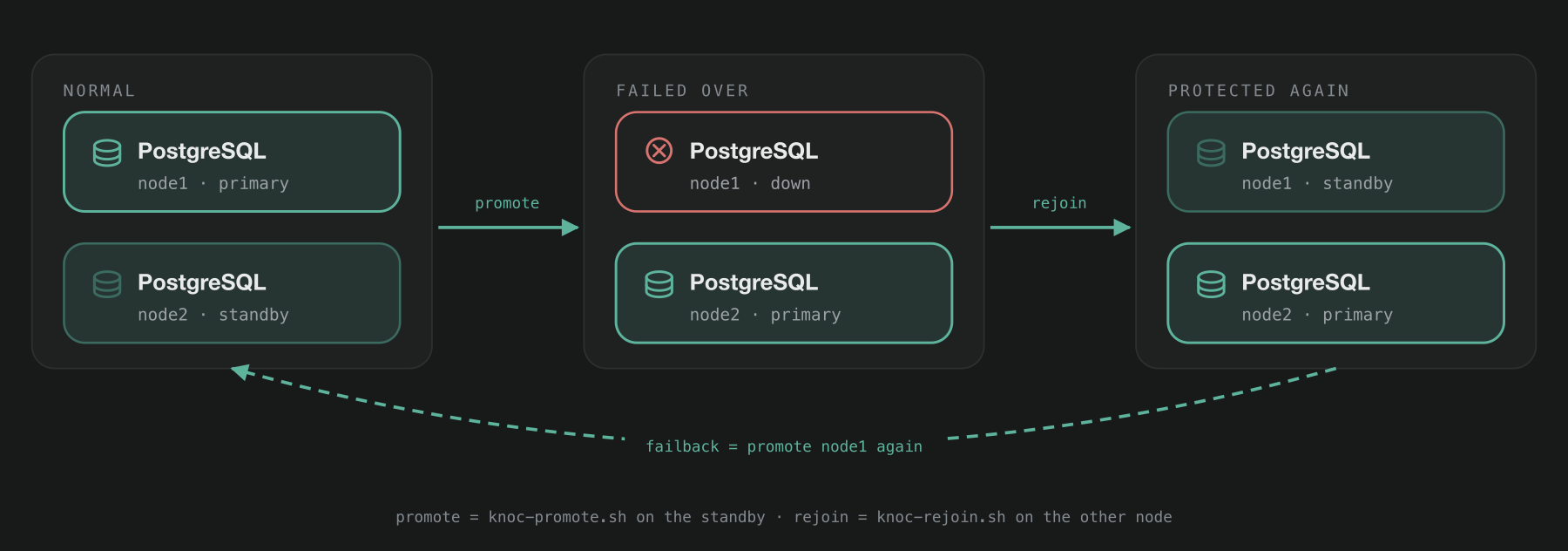
Use this for planned work such as patching or resizing, when both nodes are healthy. As long as the standby is connected when you stop the primary, no data is lost, because the primary sends the standby everything before it shuts down. Step 2 checks that the standby is connected.
# 1. On each web node: stop Knocknoc so nothing writes during the switch
sudo systemctl stop knocknoc

# 2. On node1 (current primary): check the standby is connected and up to date.
#    Expect one row for 10.0.0.2, state streaming, bytes_behind at or near 0.
#    No row means the standby isn't connected. Stop and fix that first.
sudo -u postgres psql -c "SELECT client_addr, state,
  pg_wal_lsn_diff(pg_current_wal_lsn(), replay_lsn) AS bytes_behind
  FROM pg_stat_replication"

# 3. On node1: stop the database
sudo systemctl stop postgresql@15-main

# 4. On node2 (current standby): promote
sudo ./knoc-promote.sh

# 5. Move db.example.com to 10.0.0.2. On each web node, once this prints
#    10.0.0.2, restart Knocknoc:
getent hosts db.example.com
sudo systemctl restart knocknoc

# 6. On node1: rejoin as the standby of node2
sudo ./knoc-rejoin.sh 10.0.0.2
Stop Knocknoc in step 1 even if your load balancer health-checks /_status. That check keeps passing while the database is down, so the load balancer won't take the web nodes out of service, and users see errors instead. Knocknoc is unavailable from step 1 until the restart in step 5, which usually takes under a minute. Existing grants stay in place throughout. Agents keep enforcing the access they already have and reconnect on their own, so nobody loses access while you work.
While Knocknoc is stopped, you may see the message "backend knocknoc has no server available!" in your terminal. This message comes from HAProxy on the web node, and you can ignore it.
Failback
Failing back is the same as a planned failover, with node1 and node2 swapped. The original primary isn't special in any way.
Before you start, check pg_stat_replication on node2 to make sure node1 is connected and up to date. Then follow the planned failover steps with the nodes swapped:
- Stop Knocknoc on each web node.
- Stop PostgreSQL on node2.
- Run
knoc-promote.shon node1. - Point
db.example.comback at 10.0.0.1, and restart Knocknoc on each web node once it resolves to the new address. - Run
knoc-rejoin.sh 10.0.0.1on node2.
You don't have to fail back. Once knoc-rejoin.sh has finished, either node works as the primary and you're fully protected again. Fail back whenever it suits you, or not at all.
Unplanned failover
Use this when the primary has failed or can't be reached, so it can't be shut down cleanly. Any changes that hadn't reached the standby are lost. That's usually less than a second's worth.
Check first, then fence
ping -c3 node1
ssh node1 'systemctl is-active postgresql@15-main'
If node1 is still running but misbehaving, a web node may still be writing to it. If you promote node2 at that point, you'll have two primaries with different data. So before promoting, fence node1, which means making sure nothing can reach it. Power it off through IPMI or the BMC, stop the instance through your hypervisor or cloud console, or disconnect it from the network. Decide in advance which method you'll use and write it down, so you don't have to work it out during an outage.
If node1 is completely down, with no power and no network, it's already fenced.
# 1. On node2 (standby): promote without waiting for node1
sudo ./knoc-promote.sh

# 2. Move db.example.com to 10.0.0.2. On each web node, once this prints
#    10.0.0.2, restart Knocknoc:
getent hosts db.example.com
sudo systemctl restart knocknoc

# 3. When node1 is repaired, keep it off the network and, from its console:
sudo systemctl stop postgresql@15-main
sudo -u postgres touch /var/lib/postgresql/15/main/standby.signal

# 4. Reconnect node1, then on node1
sudo ./knoc-rejoin.sh 10.0.0.2
Step 3 matters because node1 doesn't know it has been replaced. When it comes back, PostgreSQL starts as a primary, and anything that can reach it can write to it. With standby.signal in place, PostgreSQL on node1 starts read-only until knoc-rejoin.sh rebuilds it. Until step 4 is done, you're running on one database server with no standby, so rebuild node1 as soon as you can.
When the old primary is not coming back
Build a replacement server on a new address, for example node3 on 10.0.0.3. Follow steps 1 and 2 of the build, using 10.0.0.3 wherever it says 10.0.0.1. Then update the primary to allow the new node:
# On node2 (the primary): allow the new node and remove the old one
sudo sed -i 's|10\.0\.0\.1/32|10.0.0.3/32|' /etc/postgresql/15/main/pg_hba.conf
sudo -u postgres psql -c "SELECT pg_reload_conf()"

# with ufw
sudo ufw delete allow from 10.0.0.1 to any port 5432 proto tcp
sudo ufw allow from 10.0.0.3 to any port 5432 proto tcp

# or with firewalld
sudo firewall-cmd --permanent --remove-rich-rule='rule family="ipv4" source address="10.0.0.1/32" port port="5432" protocol="tcp" accept'
sudo firewall-cmd --permanent --add-rich-rule='rule family="ipv4" source address="10.0.0.3/32" port port="5432" protocol="tcp" accept'
sudo firewall-cmd --reload
Then run knoc-rejoin.sh 10.0.0.2 on node3 to set it up as the new standby, and add node3 to DNS. If your web nodes' addresses have changed as well, update their entries in pg_hba.conf and the firewall on both database nodes.
After any failover
# On the new primary
sudo -u postgres psql -c "SELECT pg_is_in_recovery()"          # expect f
sudo -u postgres psql -c "SELECT client_addr, state,
  pg_wal_lsn_diff(pg_current_wal_lsn(), replay_lsn) AS bytes_behind
  FROM pg_stat_replication"

# On the new standby
sudo -u postgres psql -c "SELECT pg_is_in_recovery()"          # expect t

# On each web node
getent hosts db.example.com

# From anywhere
curl -sS -o /dev/null -w '%{http_code}\n' https://knocknoc.example.com/_status- The new primary reports
fforpg_is_in_recovery()and the new standby reportst. pg_stat_replicationon the primary lists the standby withstate = streaming.- Every web node can reach the new primary. In the admin portal, check that each server is listed and online.
- A test user can log in and grant themselves access to one knoc.
- Your monitoring and alerts now point at the new primary, not the old one.
Still Having Issues?
We can help you out, contact us at [email protected].