
Migrating the database (WIP)
Draft, not published. Visible to Editors and Admins only.
This guide explains how to move the Knocknoc database to a different PostgreSQL server. For example, you might move it off your Knocknoc server onto a dedicated database server, or onto a managed service such as Amazon RDS. The same steps work for moving to a newer version of PostgreSQL.
If you're moving Knocknoc itself to a new machine, along with its database, see Moving your Knocknoc server instead.
If your server still uses SQLite, follow Moving from SQLite to PostgreSQL instead. You can tell which one you have from /opt/knocknoc/etc/knocknoc.conf. It has a DBURL line for PostgreSQL, or a DBFile line for SQLite.
How it works
Knocknoc keeps all of its data in one PostgreSQL database. To move it, you:
- stop Knocknoc
- copy the database to the new server with
pg_dumpandpg_restore - change
DBURLin/opt/knocknoc/etc/knocknoc.confto point at the new server - start Knocknoc again.
The old database isn't changed. If something goes wrong, you can put the old DBURL back and start Knocknoc again.
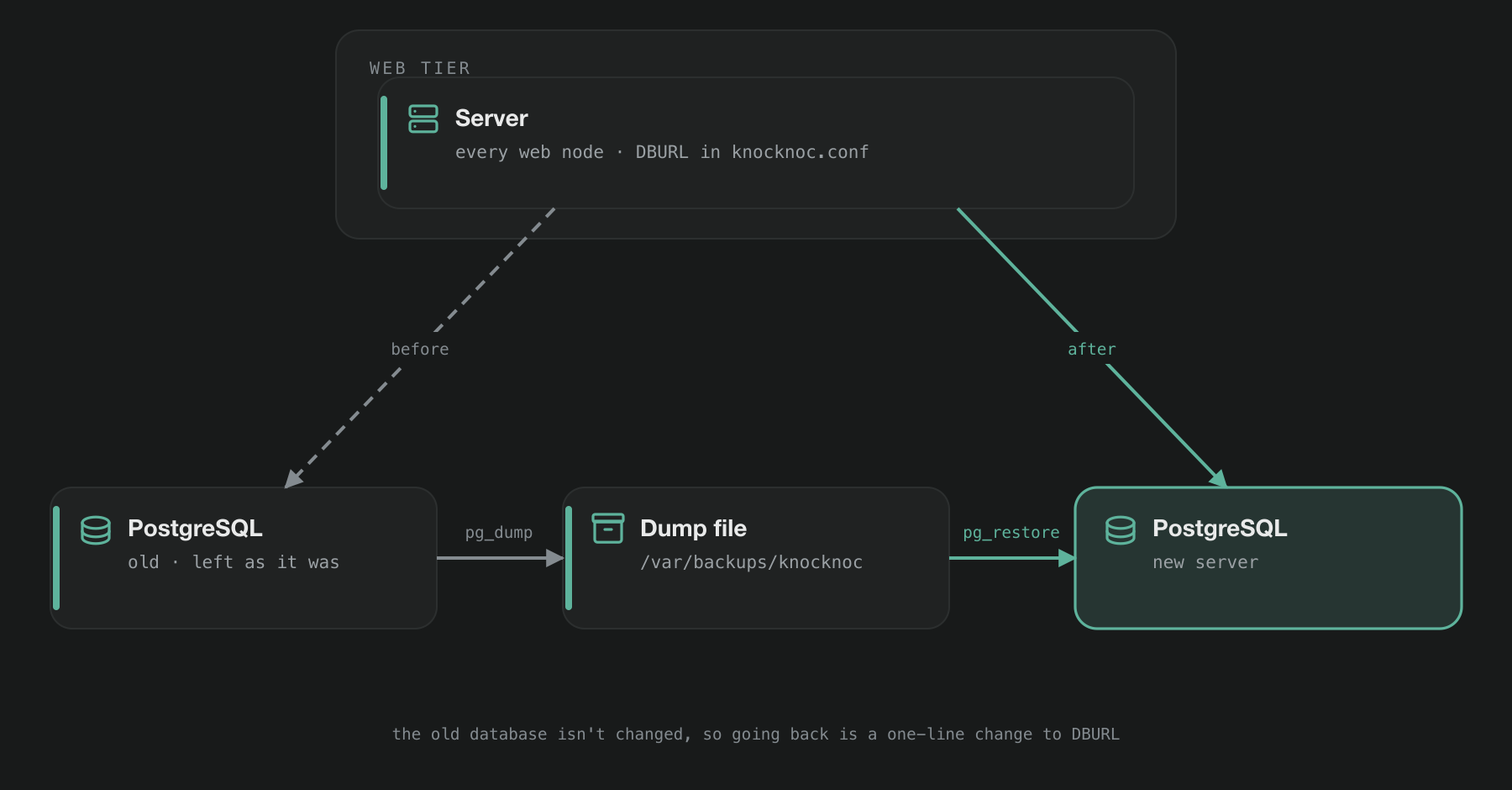
While Knocknoc is stopped, users can't sign in or request access. Any access they already have stays in place. The time this takes depends on the size of your database. The script below shows you the size before it makes any changes.
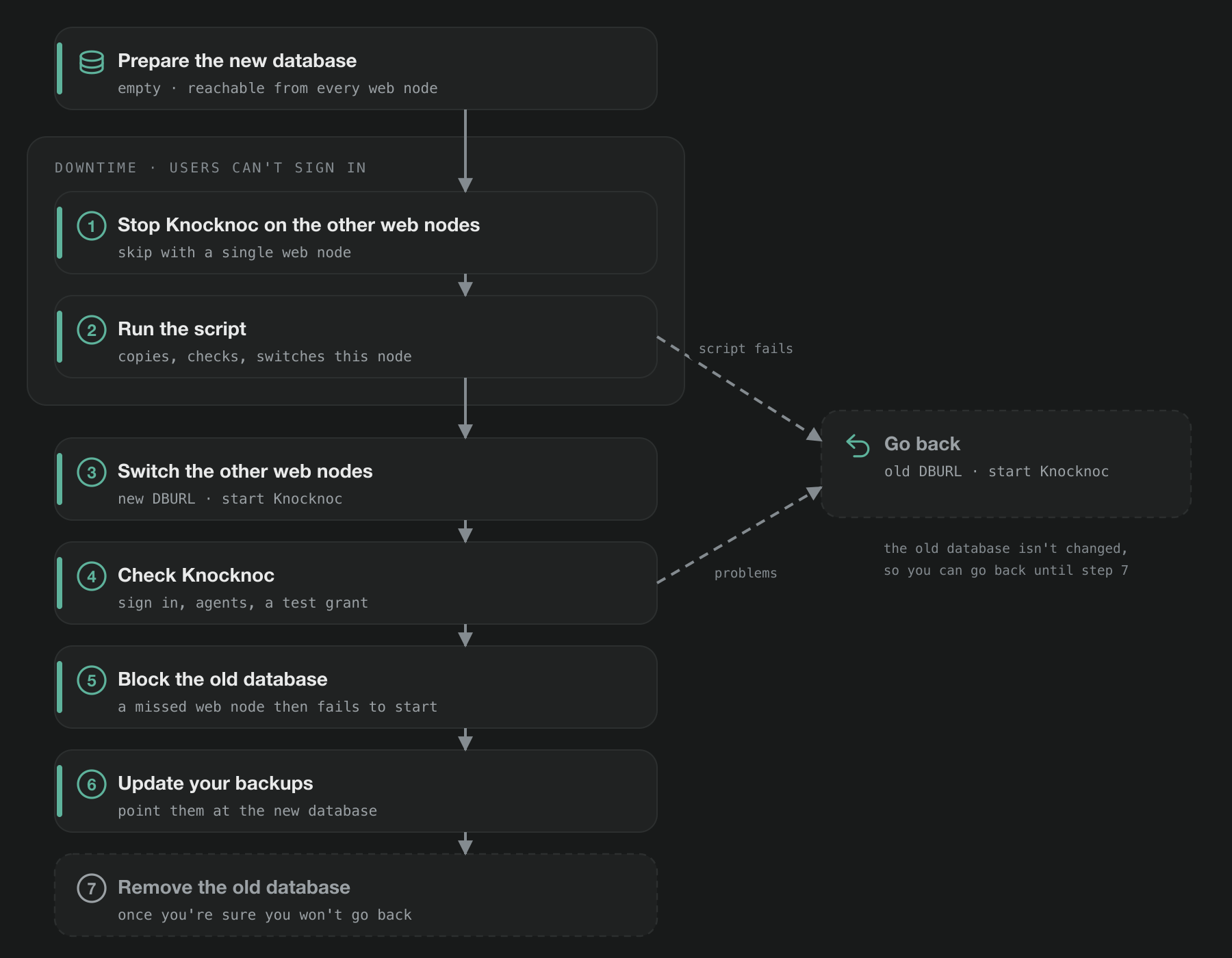
Step 2 uses a script, knoc-db-move.sh, to copy the database and switch the first web node over. If you'd rather run the commands yourself, see Moving the database by hand.
Before you start
- Use the same or a newer major version of PostgreSQL on the new server. These steps don't work for moving to an older version.
- Don't upgrade Knocknoc during the same maintenance window. If something goes wrong, it's then easier to tell which change caused it.
- Take a backup first, as described on the Backups page.
- Put the new database server close to your web nodes, ideally in the same data center or cloud region. A slow network link between them makes signing in slower.
- Each web node can open up to 30 connections to the database. Check that the new server allows at least 30 for each web node, plus a few extra for admin tools. Some small managed database plans have a lower limit. If yours does, you can reduce Knocknoc's connections with
pool_max_conns, as described on BYO PostgreSQL. - Pick a quiet time, and let your users know when Knocknoc will be unavailable.
Prepare the new database
Create an empty database called knocknoc, owned by a user called knocknoc. The user doesn't need to be a superuser, and Knocknoc doesn't need any PostgreSQL extensions.
Give the user a password made up of only letters and numbers. You can generate one with openssl rand -hex 24. Other characters work too, but you'll need to encode them when you put the password in DBURL, as explained below.
On your own PostgreSQL server
Create the user and the database. createuser asks you to type the password twice.
sudo -u postgres createuser --pwprompt knocknoc
sudo -u postgres createdb -O knocknoc knocknoc
By default, PostgreSQL only accepts connections from the same machine. To let your web nodes connect, set this in postgresql.conf:
listen_addresses = '*'Then add a line to pg_hba.conf for each Knocknoc web node, using your own addresses:
# Knocknoc web nodes
host    knocknoc        knocknoc        10.0.0.10/32            scram-sha-256
host    knocknoc        knocknoc        10.0.0.11/32            scram-sha-256
On Debian and Ubuntu, both files are in /etc/postgresql/<version>/main/. On RHEL, Rocky and Alma, they're in /var/lib/pgsql/data/, or in /var/lib/pgsql/<version>/data/ if you installed PostgreSQL from the PostgreSQL yum repository. Restart PostgreSQL to apply the changes:
# Debian, Ubuntu, or the RHEL / Rocky / Alma packages
sudo systemctl restart postgresql
# PostgreSQL from the PostgreSQL yum repository, with your version number
sudo systemctl restart postgresql-17
Then allow port 5432 from each web node in the server's firewall. With ufw:
sudo ufw allow from 10.0.0.10 to any port 5432 proto tcp
sudo ufw allow from 10.0.0.11 to any port 5432 proto tcp
With firewalld, which RHEL, Rocky and Alma turn on by default:
sudo firewall-cmd --permanent --add-rich-rule='rule family="ipv4" source address="10.0.0.10/32" port port="5432" protocol="tcp" accept'
sudo firewall-cmd --permanent --add-rich-rule='rule family="ipv4" source address="10.0.0.11/32" port port="5432" protocol="tcp" accept'
sudo firewall-cmd --reload
If you'll use sslmode=require in the connection string (see Your new DBURL below), PostgreSQL also needs TLS turned on. Debian and Ubuntu turn it on by default. On RHEL, Rocky and Alma it's off. To turn it on, create a certificate in the data directory and restart PostgreSQL. Use your server's DNS name, and the data directory and service name from above:
DATA=/var/lib/pgsql/17/data
sudo -u postgres openssl req -new -x509 -days 3650 -nodes -subj "/CN=db.example.com" \
  -keyout $DATA/server.key -out $DATA/server.crt
sudo chmod 600 $DATA/server.key
echo "ssl = on" | sudo tee -a $DATA/postgresql.conf
sudo systemctl restart postgresql-17
This creates a self-signed certificate, which is enough for sslmode=require.
On a managed service
Connect as the admin user your provider set up, using psql or the provider's query editor. Then run:
CREATE ROLE knocknoc LOGIN PASSWORD 'your-password';
GRANT knocknoc TO CURRENT_USER;
CREATE DATABASE knocknoc OWNER knocknoc;
Some providers need the GRANT line before the admin user can create a database owned by knocknoc. Without it, CREATE DATABASE fails with the error must be able to SET ROLE "knocknoc". Where it isn't needed, the line just prints a notice that the admin user is already a member of the role.
Finally, allow your web nodes to connect by adding them to the provider's security group or firewall rules.
Your new DBURL
Next, work out the connection string for the new database. You'll paste it into the script in step 2. The format is explained on BYO PostgreSQL. For example:
postgres://knocknoc:[email protected]/knocknoc?sslmode=require- If your provider gives you a port other than 5432, add it after the host name, for example
@db.example.com:25060/knocknoc. Managed services often use a different port. Without it, the connection times out. sslmode=requireencrypts the connection to the database. Most managed services require it.- To also check the server's certificate, use
sslmode=verify-full&sslrootcert=/opt/knocknoc/etc/db-ca.peminstead. Download your provider's CA certificate to that path, and make sure theknocknocuser can read it. The host name in the URL must match the name on the certificate. - If your password contains anything other than letters and numbers, those characters must be encoded in the URL. For example,
@becomes%40,:becomes%3A,/becomes%2F,#becomes%23and%becomes%25. - We recommend using a DNS name for the database server, like
db.example.comabove, rather than its IP address. Then if the database moves again, you only need to update the DNS record, not the configuration on every web node. - If your current
DBURLincludespool_max_conns, include it in the new one as well, for example?sslmode=require&pool_max_conns=20.
Moving the database
1. Stop Knocknoc on the other web nodes
If you have more than one web node, choose one to run the move from. Stop Knocknoc on all the others:
sudo systemctl stop knocknocIf you only have one web node, skip this step.
Users can't sign in from this point until the script in step 2 has finished. If the setup wizard installed HAProxy on a node, you may see the message backend knocknoc has no server available! in your terminal. This is expected while Knocknoc is stopped.
2. Run the script
On the web node you're running the move from, save knoc-db-move.sh and run it:
chmod +x knoc-db-move.sh
./knoc-db-move.sh
The script asks for the new DBURL, then checks that it can connect to both databases. It shows you the PostgreSQL version and size of each, and asks you to type yes to continue. It then:
- stops Knocknoc on this node
- copies the database to the new server
- checks that every table has the same number of rows in both databases
- changes
DBURLon this node and starts Knocknoc.
If any of these steps fail, the script starts Knocknoc again on the old database and tells you what went wrong. Here's what a successful run looks like:
New DBURL (the text is hidden as you type):
Old database: PostgreSQL 15, 9887 kB
New database: PostgreSQL 17, empty
This stops Knocknoc on knocknoc1, copies the database, and switches this node to it.
Type yes to continue: yes
Copying the database to /var/backups/knocknoc/knocknoc-move-2026-09-28-043100.dump
Row counts match on all 39 tables.
Done. Knocknoc on knocknoc1 is running on the new database.
If another web node is still connected to the old database, the script stops before it copies anything. It shows the address of that node, so you can stop Knocknoc there and run the script again.
3. Switch the other web nodes
On each of the other web nodes, make a copy of the configuration file, change DBURL to the new connection string, and start Knocknoc:
sudo cp -p /opt/knocknoc/etc/knocknoc.conf /opt/knocknoc/etc/knocknoc.conf.before-move
sudo nano /opt/knocknoc/etc/knocknoc.conf
sudo systemctl start knocknoc
Give Knocknoc a few seconds to start, then check that it's running. This command should print ready:
curl -sk https://127.0.0.1:8756/_statusIf HTTPAddr in knocknoc.conf is set to a specific IP address, use that address instead of 127.0.0.1.
4. Check Knocknoc
Log in to the admin portal and run through the checks in Checking that a restore worked on the Backups page. If you have more than one web node, also check that they're all listed and online (see High availability).
5. Block the old database
Next, stop the old database from accepting connections. This makes sure no web node can keep using it by mistake. A web node that still points at the old database will fail to start, and its log will say that the database is not currently accepting connections.
On the old database server, run:
sudo -u postgres psql -c "ALTER DATABASE knocknoc ALLOW_CONNECTIONS false"If the old database is on a managed service, run the same ALTER DATABASE command as the admin user.
6. Update your backups
Make sure your database backups now come from the new server. If you use pg_dump, update your backup jobs to connect to the new database. If you've moved to a managed service, use the provider's backup tools instead. The Backups page has more detail.
You can remove any backup jobs for the old database. They'll fail from now on, because it no longer accepts connections.
7. Remove the old database
Keep the old database until you're sure you won't need to go back to it. A week or two of normal use is usually enough. Then remove it by running this on the old database server:
sudo -u postgres dropdb knocknocThe dump file from the move is in /var/backups/knocknoc on the web node you ran the script on. We suggest keeping it with your other backups for a while.
Going back
If something isn't working after the move, you can go back to the old database at any time before you remove it. First, stop Knocknoc on every web node:
sudo systemctl stop knocknocIf you've already blocked the old database in step 5, allow connections to it again by running this on the old database server:
sudo -u postgres psql -c "ALTER DATABASE knocknoc ALLOW_CONNECTIONS true"Then, on every web node, restore the old configuration file and start Knocknoc:
sudo cp -p /opt/knocknoc/etc/knocknoc.conf.before-move /opt/knocknoc/etc/knocknoc.conf
sudo systemctl start knocknoc
Any changes made after the move, such as new users, changed settings or new access history, are only in the new database. They won't be in the old one when you go back.
Moving the database by hand
If you'd rather not use the script, these commands do the same job. Run them on a web node that has the PostgreSQL client tools installed. The examples assume the old database is on the same machine, which is how a standard install is set up.
-
Stop Knocknoc on every web node.
sudo systemctl stop knocknoc -
Copy the database to a file. Run these commands from
/tmp. From your home directory,sudo -u knocknocmay print a harmless "could not change directory" warning.cd /tmp sudo install -d -o knocknoc -g knocknoc -m 750 /var/backups/knocknoc sudo -u knocknoc pg_dump -Fc knocknoc -f /var/backups/knocknoc/knocknoc-move.dumpIf the old database is on a different server, use its connection string instead.
pg_dumpasks for theknocknocuser's password on that server.sudo -u knocknoc pg_dump -Fc -d "postgres://[email protected]/knocknoc" -f /var/backups/knocknoc/knocknoc-move.dumpIf your
DBURLincludespool_max_conns, leave it out here.pg_dump,pg_restoreandpsqldon't recognize it. -
Load the file into the new database.
pg_restoreasks for the password of theknocknocuser on the new server.sudo -u knocknoc pg_restore --no-owner --no-privileges --exit-on-error --single-transaction \ -d "postgres://[email protected]/knocknoc?sslmode=require" \ /var/backups/knocknoc/knocknoc-move.dump--no-ownermakes theknocknocuser on the new server the owner of everything it restores.--single-transactionmeans that if the restore fails partway, nothing is kept. You can then fix the problem and try again with the same empty database. -
Check that every table has the same number of rows in both databases. Save this query as
/tmp/count-rows.sql:SELECT table_schema || '.' || table_name, (xpath('/row/n/text()', query_to_xml(format('SELECT count(*) AS n FROM %I.%I', table_schema, table_name), false, true, '')))[1]::text FROM information_schema.tables WHERE table_type = 'BASE TABLE' AND table_schema NOT IN ('pg_catalog', 'information_schema') ORDER BY 1;Run it against both databases and compare the results. The second command asks for the password again.
sudo -u knocknoc psql -d knocknoc -At -F ' ' < count-rows.sql > rows-old.txt
sudo -u knocknoc psql -d "postgres://[email protected]/knocknoc?sslmode=require" \
  -At -F ' ' < count-rows.sql > rows-new.txt
diff rows-old.txt rows-new.txt && echo "Row counts match"
On RHEL, Rocky and Alma,
diffmay not be installed. If you seediff: command not found, install it and run the last line again:sudo dnf install diffutilsIf the counts don't match, don't switch over. Start Knocknoc again on your web nodes, which are still set up to use the old database. Then drop the new database, create it again, and repeat the copy from step 2.
-
Make a copy of the configuration file, change
DBURLto the new connection string, and start Knocknoc:sudo cp -p /opt/knocknoc/etc/knocknoc.conf /opt/knocknoc/etc/knocknoc.conf.before-move sudo nano /opt/knocknoc/etc/knocknoc.conf sudo systemctl start knocknocGive Knocknoc a few seconds to start, then check that this prints
ready:curl -sk https://127.0.0.1:8756/_status
Then continue from step 3 in Moving the database above.
The script
knoc-db-move.sh
Save this on the web node you'll run the move from, and run it as a user with sudo access.
The script uses psql, pg_dump and pg_restore. These need to be the same version as the old database server, or newer. If the setup wizard installed PostgreSQL on this node, they're already there. Otherwise, install the PostgreSQL client package first. This is postgresql-client on Debian and Ubuntu, or postgresql on RHEL, Rocky and Alma.
The script doesn't make any changes to the old database. It saves a copy of the old configuration as knocknoc.conf.before-move, and keeps the dump file in /var/backups/knocknoc.
#!/usr/bin/env bash
# knoc-db-move.sh - copy the Knocknoc database to a new, empty PostgreSQL
# database and switch this web node over to it.
# Run on a Knocknoc web node, as a user with sudo. Stop Knocknoc on every
# other web node first.
set -euo pipefail
cd /   # avoids a harmless warning from sudo -u about your home directory

CONF=/opt/knocknoc/etc/knocknoc.conf
BACKUP_DIR=/var/backups/knocknoc
DUMP="$BACKUP_DIR/knocknoc-move-$(date +%F-%H%M%S).dump"

# Counts the rows in every table, so the two databases can be compared.
COUNT_ROWS="SELECT table_schema || '.' || table_name,
       (xpath('/row/n/text()',
              query_to_xml(format('SELECT count(*) AS n FROM %I.%I', table_schema, table_name),
                           false, true, '')))[1]::text
FROM information_schema.tables
WHERE table_type = 'BASE TABLE'
  AND table_schema NOT IN ('pg_catalog', 'information_schema')
ORDER BY 1"

# psql, pg_dump and pg_restore don't accept pool_max_conns, so remove it.
for_psql() {
  local base=${1%%\?*} query="" out="" p
  [[ $1 == *\?* ]] && query=${1#*\?}
  IFS='&' read -ra params <<< "$query"
  for p in "${params[@]}"; do
    [[ $p == pool_* ]] || out+=${out:+&}$p
  done
  echo "$base${out:+?$out}"
}

# -P pager=off stops psql pausing its output with "Press RETURN".
BIN=""   # set below on Debian and Ubuntu
old() { sudo -u knocknoc "${BIN}psql" -P pager=off -d "$(for_psql "$OLD")" -Atq -F ' ' -c "$1"; }
new() { sudo -u knocknoc "${BIN}psql" -P pager=off -d "$(for_psql "$NEW")" -Atq -F ' ' -c "$1"; }

start_on_old() {
  sudo systemctl start knocknoc
  echo "Knocknoc has been started again on the old database." >&2
}

for tool in psql pg_dump pg_restore curl; do
  command -v "$tool" > /dev/null || { echo "$tool isn't installed on this host." >&2; exit 1; }
done

OLD=$(sudo sed -nE 's/^DBURL *= *"(.*)"/\1/p' "$CONF")
if [ -z "$OLD" ]; then
  echo "No DBURL line found in $CONF." >&2
  echo "If this server still uses SQLite, move it to PostgreSQL first." >&2
  exit 1
fi

read -rsp "New DBURL (the text is hidden as you type): " NEW; echo
case $NEW in
  postgres://*|postgresql://*) ;;
  *) echo "The new DBURL must start with postgres://" >&2; exit 1 ;;
esac
case $NEW in
  *[\"\\[:space:]]*) echo "The new DBURL can't contain spaces, quotes or backslashes." >&2; exit 1 ;;
esac

# Checks. Nothing has been changed yet.
old_ver=$(old 'SHOW server_version_num') || { echo "Can't connect to the old database." >&2; exit 1; }
# On Debian and Ubuntu, pg_dump uses the version of any PostgreSQL server on this machine.
# Use the tools that match the old database instead, if they're installed.
if [ -x "/usr/lib/postgresql/$((old_ver / 10000))/bin/pg_dump" ]; then
  BIN="/usr/lib/postgresql/$((old_ver / 10000))/bin/"
fi
new_ver=$(new 'SHOW server_version_num') || {
  echo "Can't connect to the new database. Check the DBURL, and that the new server" >&2
  echo "accepts connections from this host." >&2
  exit 1
}
if [ $((new_ver / 10000)) -lt $((old_ver / 10000)) ]; then
  echo "The new server runs PostgreSQL $((new_ver / 10000)), which is older than the current server ($((old_ver / 10000)))." >&2
  echo "Use a server running the same version or newer." >&2
  exit 1
fi
dump_ver=$("${BIN}pg_dump" --version | grep -oE '[0-9]+' | head -1)
if [ "$dump_ver" -lt $((old_ver / 10000)) ]; then
  echo "pg_dump on this host is version $dump_ver, older than the database it would copy." >&2
  echo "Install the PostgreSQL $((old_ver / 10000)) client tools, or run this on a host that has them." >&2
  exit 1
fi
if [ "$(new "SELECT count(*) FROM information_schema.tables
             WHERE table_schema NOT IN ('pg_catalog', 'information_schema')")" != 0 ]; then
  echo "The new database already has tables in it, but it needs to be empty." >&2
  echo "Drop it, create it again, then run this script again." >&2
  exit 1
fi

echo "Old database: PostgreSQL $((old_ver / 10000)), $(old 'SELECT pg_size_pretty(pg_database_size(current_database()))')"
echo "New database: PostgreSQL $((new_ver / 10000)), empty"
echo "This stops Knocknoc on $(hostname), copies the database, and switches this node to it."
read -rp "Type yes to continue: " confirm
[ "$confirm" = yes ] || { echo "Aborted."; exit 1; }

sudo systemctl stop knocknoc

# Stop here if another web node is still using the old database.
others=$(old "SELECT count(*) FROM pg_stat_activity
              WHERE datname = current_database() AND pid <> pg_backend_pid()
                AND backend_type = 'client backend'")
if [ "$others" != 0 ]; then
  echo "Something else is still connected to the old database:" >&2
  old "SELECT format('  %s, user %s, %s connection(s)',
              coalesce(host(client_addr), 'this host'), usename, count(*))
       FROM pg_stat_activity
       WHERE datname = current_database() AND pid <> pg_backend_pid()
         AND backend_type = 'client backend'
       GROUP BY client_addr, usename" >&2
  echo "Stop Knocknoc on every other web node, then run this again." >&2
  start_on_old
  exit 1
fi

sudo install -d -o knocknoc -g knocknoc -m 750 "$BACKUP_DIR"
echo "Copying the database to $DUMP"
sudo -u knocknoc "${BIN}pg_dump" -Fc -d "$(for_psql "$OLD")" -f "$DUMP"

# The restore runs as one transaction, so if it fails the new database is left empty.
if ! sudo -u knocknoc "${BIN}pg_restore" --no-owner --no-privileges --exit-on-error --single-transaction \
     -d "$(for_psql "$NEW")" "$DUMP"; then
  echo "The restore failed. The new database is still empty." >&2
  start_on_old
  exit 1
fi

old_counts=$(old "$COUNT_ROWS")
new_counts=$(new "$COUNT_ROWS")
if [ "$old_counts" != "$new_counts" ]; then
  echo "The row counts don't match between the two databases:" >&2
  paste -d ' ' <(echo "$old_counts") <(echo "$new_counts") \
    | awk '$1 != $3 || $2 != $4 { print "  old: " $1 " " $2 "   new: " $3 " " $4 }' >&2
  echo "Before you retry, drop the new database and create it again." >&2
  start_on_old
  exit 1
fi
echo "Row counts match on all $(echo "$new_counts" | wc -l) tables."

# Keep the old configuration, then point DBURL at the new database.
sudo cp -p "$CONF" "$CONF.before-move"
sudo cat "$CONF.before-move" \
  | NEWURL=$NEW awk '/^DBURL *=/ { print "DBURL = \"" ENVIRON["NEWURL"] "\""; next } { print }' \
  | sudo tee "$CONF" > /dev/null
sudo systemctl start knocknoc

addr=$(sudo sed -nE 's/^HTTPAddr *= *"(.*)"/\1/p' "$CONF")
addr=${addr:-127.0.0.1:8756}
addr=${addr/0.0.0.0/127.0.0.1}
for _ in $(seq 1 30); do
  [ "$(curl -sk "https://$addr/_status" || true)" = ready ] && break
  sleep 2
done
if [ "$(curl -sk "https://$addr/_status" || true)" != ready ]; then
  echo "Knocknoc didn't start on the new database within 60 seconds." >&2
  echo "Check the log with: sudo journalctl -u knocknoc" >&2
  sudo systemctl stop knocknoc
  sudo cp -p "$CONF.before-move" "$CONF"
  start_on_old
  exit 1
fi

cat <<EOF
Done. Knocknoc on $(hostname) is running on the new database.
The copy is in $DUMP and the old configuration is in $CONF.before-move.

Next:
  1. On each other web node, set DBURL to the new connection string and start Knocknoc.
  2. Stop the old database from accepting connections.
  3. Point your backups at the new database.

To go back to the old database on this node:
  sudo systemctl stop knocknoc
  sudo cp -p $CONF.before-move $CONF
  sudo systemctl start knocknoc
EOF
Upgrading PostgreSQL on the same server
If you want to upgrade PostgreSQL but keep it on the same server, you don't need to move the database. Take a backup, stop Knocknoc, upgrade PostgreSQL, and start Knocknoc again. DBURL stays the same.
On Debian and Ubuntu, use pg_upgradecluster. This example upgrades from version 15 to 17. First, stop Knocknoc and install the new version from your distribution or the PostgreSQL apt repository:
sudo systemctl stop knocknoc
sudo apt install postgresql-17
apt may ask a question like Upgrade PostgreSQL cluster 15/main to 18?, naming the newest version it knows about. Answer no. You'll choose the version yourself in a moment.
Next, list the clusters:
pg_lsclustersIf this shows an empty 17 main cluster, remove it:
sudo pg_dropcluster --stop 17 mainThen upgrade, and start Knocknoc again:
sudo pg_upgradecluster -v 17 15 main
sudo systemctl start knocknoc
Always give the new version with -v. Otherwise pg_upgradecluster upgrades to the newest version installed, which may not be the one you want.
After the upgrade, the old cluster is still there, stopped, on port 5433. Once you're happy everything works, remove it:
sudo pg_dropcluster 15 mainOn RHEL, Rocky and Alma, stop Knocknoc and follow PostgreSQL's pg_upgrade instructions. Alternatively, set up the new version on a separate server and move the database using this guide.
Troubleshooting
must be able to SET ROLE "knocknoc"
This happens on some managed services, where the admin user isn't a full superuser. Run GRANT knocknoc TO CURRENT_USER; and then run CREATE DATABASE again.
no pg_hba.conf entry for host
The new database server isn't set up to accept connections from this machine. On your own server, add a line for this machine's address to pg_hba.conf and restart PostgreSQL. On a managed service, check that the connection string includes sslmode=require. Some providers give this error for connections that aren't encrypted.
invalid URI query parameter: "pool_max_conns"
psql, pg_dump and pg_restore don't recognize pool_max_conns. Remove it from the connection string you give those tools, but keep it in DBURL.
aborting because of server version mismatch
The pg_dump on this machine is an older version than the database server. Install the PostgreSQL client tools for the server's version, or run the copy from a machine that already has them. On Debian and Ubuntu, newer versions come from the PostgreSQL apt repository, for example as the postgresql-client-17 package.
On Debian and Ubuntu, pg_dump and pg_restore use the version of any PostgreSQL server running on the same machine, even after you install newer client tools. Run the newer ones by their full path instead, for example /usr/lib/postgresql/17/bin/pg_dump and /usr/lib/postgresql/17/bin/pg_restore. The script does this for you.
database "knocknoc" is not currently accepting connections
This web node is still using the old database, which you blocked in step 5. Change its DBURL to the new connection string and start Knocknoc.
The new database already has tables in it
The new database has to be empty, and this one isn't. This usually happens after an earlier attempt. Drop the database and create it again. On your own server:
sudo -u postgres dropdb knocknoc
sudo -u postgres createdb -O knocknoc knocknoc
On a managed service, run these as the admin user:
DROP DATABASE knocknoc;
CREATE DATABASE knocknoc OWNER knocknoc;
Still Having Issues?
We can help you out, contact us at [email protected].