
298002 - TLS/SSL Certificate Error
Agent error code #298002 indicates that the agent encountered a TLS/SSL certificate error when attempting to connect to a firewall. The secure connection could not be established because the certificate presented by the firewall failed validation.
This error occurs when:
192.168.1.1 but the certificate was issued for firewall.example.com)
The certificate is otherwise invalid or malformed
Steps to Resolve
Option 1: Enable Insecure Mode (Self-Signed Certificates)
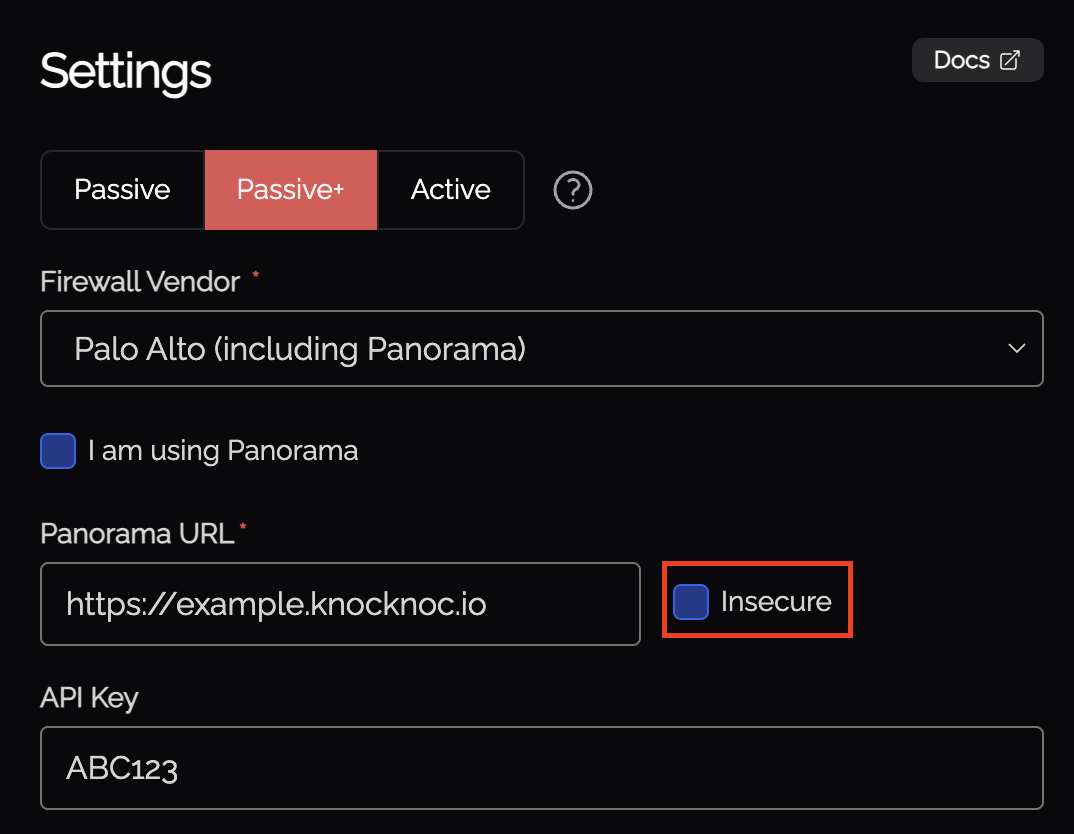
If your firewall uses a self-signed certificate or a certificate from an internal CA, you can configure the agent to skip certificate verification:
This option tells the agent to accept the certificate without validating it against a trusted CA. This is common when the firewall is running locally or within an isolated network - the connection is still encrypted, just not externally verified.
Option 2: Use a Valid Certificate on the Firewall
For production environments, consider configuring your firewall with a certificate that the agent can validate:
Option 3: Verify Hostname Configuration
If the certificate is valid but the hostname doesn't match:
Option 4: Check Certificate Expiry
If the certificate has expired:
Still Having Issues?
We can help you out, contact us at support@knocknoc.io.