
201102 - Failed to Delete Address Object
Agent error code #201102 indicates that the Knocknoc agent was unable to delete an address object from the SonicWall firewall.
This error occurs when:
- The API user does not have permission to delete address objects
- The address object is still referenced by a firewall rule or another address group (outside of Knocknoc's managed groups)
- The SonicWall API returned an unexpected error
Steps to Resolve
Verify API User Permissions
The API user must have sufficient permissions to delete address objects:
- Log into the SonicWall management interface
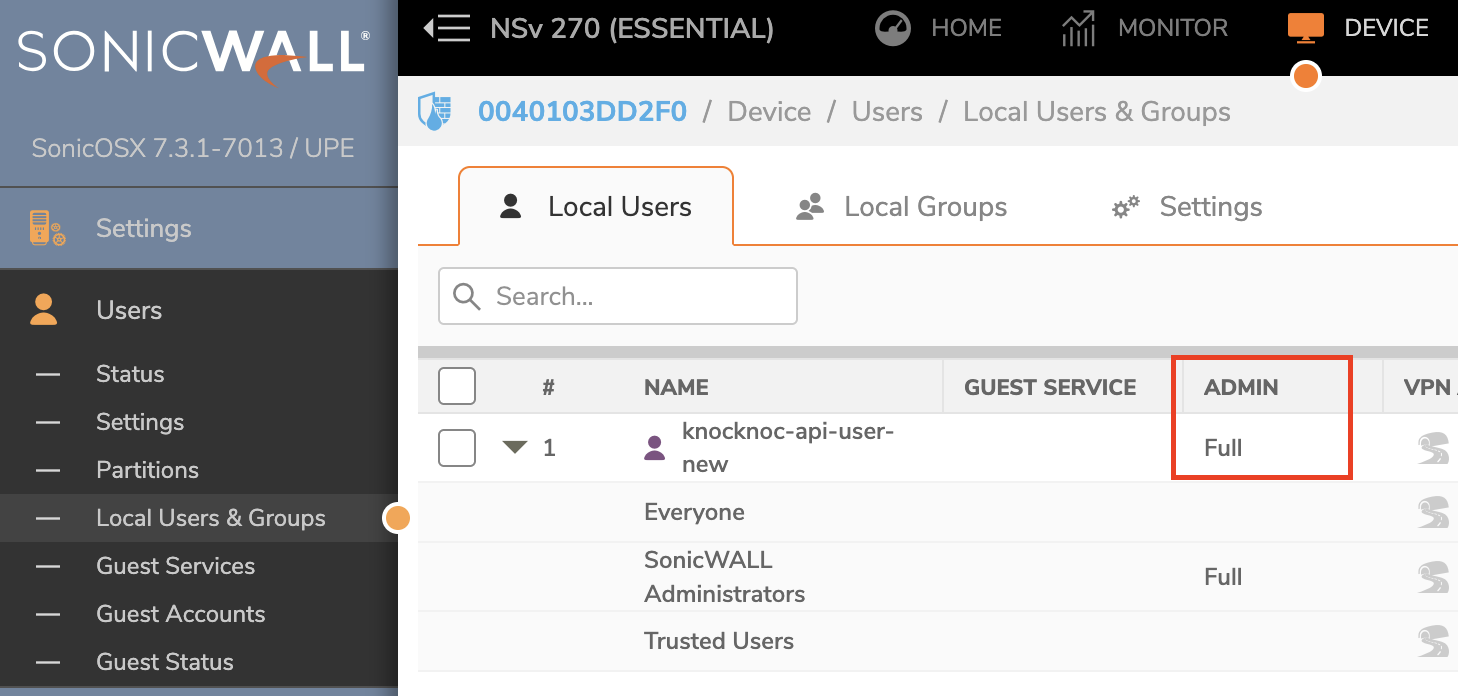
- Navigate to Device > Users > Local Users & Groups
- Verify the API user has administrative privileges or appropriate write permissions for address objects
- If the user belongs to a restricted group, consider assigning them to a group with full administrative access
For more details on API user configuration, see the SonicWall backend setup guide: TODOguide.
Check for Object References
SonicWall prevents deletion of address objects that are still in use. If the address object is referenced elsewhere:
- In the SonicWall management interface, navigate to Object > Match Objects > Addresses
- Search for the address object (Knocknoc creates objects with names in the format
kk-<username>-<ip>) - Check if the object is referenced by any firewall rules or address groups outside of the Knocknoc-managed groups
- Remove any external references before attempting to revoke access again
Still Having Issues?
We can help you out, contact us at support@knocknoc.io.